
The keyboard covered the field, and the fix was not imePadding
Insets, soft-input mode, scroll position and focus order are four systems, and three are configured outside Compose.
TL;DR
A text field covered by the keyboard is four separate problems wearing one symptom: whether the window resizes, whether Compose knows about the inset, whether the scrollable container scrolls the focused field into view, and whether focus moves correctly between fields.
Modifier.imePadding() addresses one of them, and only if the window is configured to report the
inset in the first place. Ours was not — android:windowSoftInputMode was adjustResize on one
activity and absent on another, and enableEdgeToEdge() had never been called — so imePadding()
measured zero and looked broken.
Fix the window first, then the inset, then the scroll, then the focus order. In that order, because each one depends on the previous.
The case this post is about
A five-field address form:
@Composable
fun AddressForm(state: AddressState, onChange: (AddressState) -> Unit) {
    Column(Modifier.verticalScroll(rememberScrollState()).padding(16.dp)) {
        OutlinedTextField(state.line1, { onChange(state.copy(line1 = it)) }, label = { Text("Address line 1") })
        OutlinedTextField(state.line2, { onChange(state.copy(line2 = it)) }, label = { Text("Address line 2") })
        OutlinedTextField(state.city,  { onChange(state.copy(city = it)) },  label = { Text("City") })
        OutlinedTextField(state.post,  { onChange(state.copy(post = it)) },  label = { Text("Postcode") })
        OutlinedTextField(state.phone, { onChange(state.copy(phone = it)) }, label = { Text("Phone") })
        Button(onClick = { … }, modifier = Modifier.fillMaxWidth()) { Text("Save") }
    }
}
Nothing unusual, and four separate complaints came out of it.
The symptom
The last two fields were unreachable. Tapping Postcode put the keyboard over it:
screen 2340px, keyboard 980px
  Postcode field at y=1680  → behind the keyboard
  Phone field    at y=1860  → behind the keyboard
  Save button    at y=2040  → behind the keyboard
imePadding() did nothing. The obvious fix, applied and shipped, with no observable change:
Column(Modifier.verticalScroll(…).imePadding()) // no effect
The Enter key dismissed the keyboard instead of advancing. Users had to tap each field, and on the last field Enter did nothing at all.
And on one activity the layout jumped. The same form, opened from a different entry point, behaved differently — the window panned rather than resized, so the whole screen slid up and the header went off-screen.
Why the obvious fix failed
"Add imePadding()." It measures WindowInsets.ime, and that inset is only non-zero when the
window is configured to receive it. With adjustPan (or no declaration, inheriting the theme's
default) the IME inset reported to the view hierarchy is zero, so imePadding() applies zero
padding and appears broken.
"Set windowSoftInputMode="adjustResize"." Necessary and, on its own, it made the first
activity work and not the second — because the manifest entry is per-activity and we had set it on
one. It also still did not scroll the focused field into view; it only stopped it being covered when
it happened to be above the keyboard already.
"Add Modifier.navigationBarsPadding() as well." Different inset, different problem. We were
now applying three insets and had not fixed the underlying window configuration, so two of them
measured zero.
"Wrap the form in a Scaffold." Scaffold handles some insets for you, which made the symptom
change rather than resolve — and masked the fact that the window was still wrong.
The actual mechanism
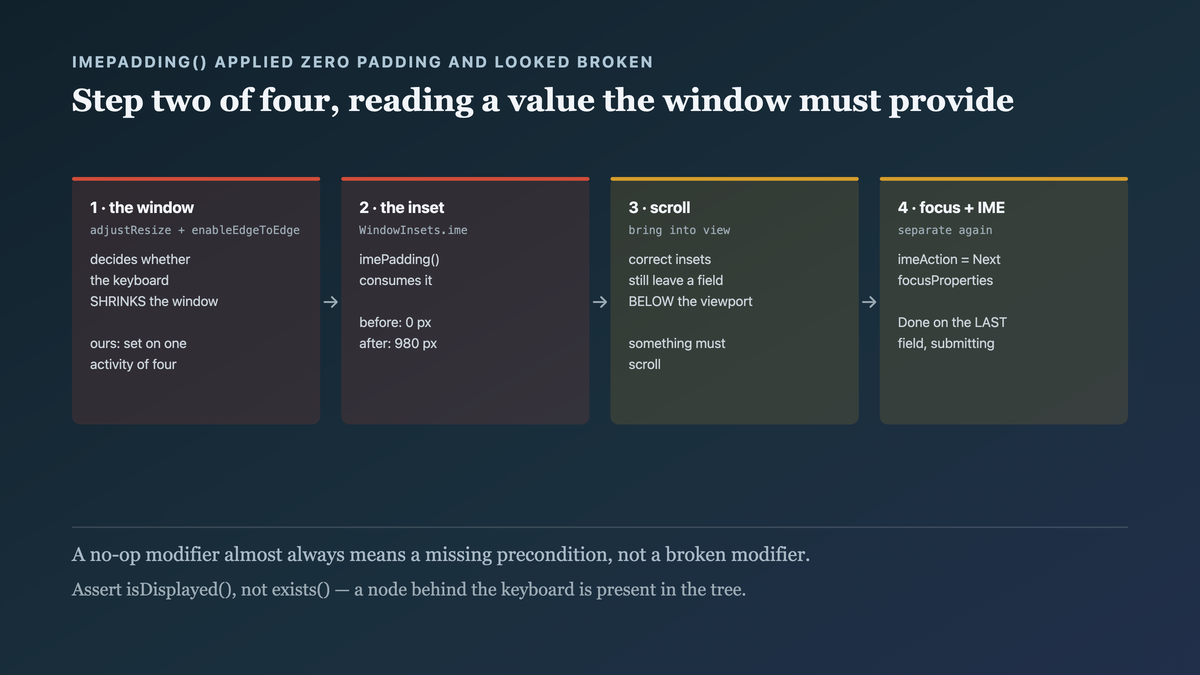
Four systems, in a dependency chain:
1. The window decides whether it resizes. android:windowSoftInputMode on the activity (or
WindowCompat.setDecorFitsSystemWindows) determines whether the keyboard shrinks the window
(adjustResize) or slides it (adjustPan). With adjustPan, nothing in your layout is told the
keyboard exists.
2. Compose reads the inset, if it is reported. WindowInsets.ime is a value that comes from the
window. imePadding() consumes it. If step 1 did not happen, this value is zero and every inset
modifier is a no-op.
3. The scrollable container must bring the focused field into view. Even with correct insets, a field below the visible area is still off-screen — something has to scroll. Compose does this automatically only when the focused node is inside a scrollable that supports it and the inset is animating correctly.
4. Focus order and IME actions are separate again. imeAction and keyboardActions control
what Enter does; focus order controls where it goes.
So imePadding() sits at step 2 of 4, and it was failing because step 1 was wrong — which is why it
looked like the modifier was broken.

imePadding()is step two of four, and it reads a value the window has to provide. A no-op inset modifier almost always means the window configuration, not the modifier.
The fix
All four, in order.
1. The window — edge-to-edge and adjustResize, once, for every activity:
<!-- AndroidManifest.xml — on EVERY activity, not one -->
<activity
    android:name=".MainActivity"
    android:windowSoftInputMode="adjustResize" />
// MainActivity.kt
override fun onCreate(savedInstanceState: Bundle?) {
    enableEdgeToEdge()                  // Compose then receives the real insets
    super.onCreate(savedInstanceState)
    setContent { AppTheme { AppRoot() } }
}
enableEdgeToEdge() plus adjustResize is what makes WindowInsets.ime non-zero. Without it,
everything below is decoration.
2. The inset, applied at the right level:
@Composable
fun AddressForm(state: AddressState, onChange: (AddressState) -> Unit) {
    Column(
        Modifier
            .fillMaxSize()
            .verticalScroll(rememberScrollState())
            .imePadding()                                 // now measures the real inset
            .padding(16.dp)
    ) { … }
}
The sub-case that appears once step 1 is finally right: inside a Scaffold, that
imePadding() is now applied twice. Scaffold consumes window insets itself and hands its
content a PaddingValues already accounting for them, so adding imePadding() on the content
reserves the keyboard's height a second time — a blank gap exactly as tall as the keyboard, which
reads as "the inset is too big" and sends people back to tuning the modifier they just fixed.
Consume it in one place. Either let the Scaffold do it:
Scaffold(
    contentWindowInsets = WindowInsets.ime,     // the Scaffold owns it
) { inner ->
    Column(Modifier.padding(inner).verticalScroll(rememberScrollState())) { … }
}
…or opt the Scaffold out and keep imePadding() on the content:
Scaffold(contentWindowInsets = WindowInsets(0)) { inner -> … }
Not both. The general shape: an inset is a resource that gets consumed, and two consumers each
doing it correctly is still wrong — which is the same reason nesting two imePadding() modifiers
in one tree double-pads.
3. Scroll the focused field into view, which is the step people miss entirely:
OutlinedTextField(
    value = state.post,
    onValueChange = { onChange(state.copy(post = it)) },
    label = { Text("Postcode") },
    modifier = Modifier
        .fillMaxWidth()
        .bringIntoViewRequester(postRequester)
        .onFocusEvent { if (it.isFocused) scope.launch { postRequester.bringIntoView() } },
)
In practice Modifier.imeNestedScroll() on the scrollable plus correct insets handles most cases
automatically — and an explicit BringIntoViewRequester is what fixes the stubborn ones, in
particular a field near the bottom with a button below it.
4. Focus order and IME actions, declared:
val (line1, line2, city, post, phone) = remember { FocusRequester.createRefs() }

OutlinedTextField(
    value = state.line1, onValueChange = …,
    modifier = Modifier.focusRequester(line1).focusProperties { next = line2 },
    keyboardOptions = KeyboardOptions(imeAction = ImeAction.Next),
    keyboardActions = KeyboardActions(onNext = { line2.requestFocus() }),
)
…
OutlinedTextField(
    value = state.phone, onValueChange = …,
    modifier = Modifier.focusRequester(phone),
    keyboardOptions = KeyboardOptions(
        keyboardType = KeyboardType.Phone,
        imeAction = ImeAction.Done,                       // last field: Done, not Next
    ),
    keyboardActions = KeyboardActions(onDone = { keyboard?.hide(); onSave() }),
)
Two details worth naming: imeAction = Done on the last field with an onDone that submits is
what makes the form completable from the keyboard, and keyboardType per field (Phone,
Number, Email) is a one-line change that materially improves the experience and is almost always
forgotten.
And the manifest check, because this was a per-activity inconsistency:
# CI: every activity must declare adjustResize
ACTS=$(grep -c '<activity' app/src/main/AndroidManifest.xml)
RESIZE=$(grep -c 'windowSoftInputMode="adjustResize"' app/src/main/AndroidManifest.xml)
[ "$ACTS" -eq "$RESIZE" ] || { echo "❌ $((ACTS-RESIZE)) activity(ies) without adjustResize"; exit 1; }
How we proved it
That the inset was zero before the window fix — the measurement that explained why
imePadding() looked broken:
// a temporary debug readout
val ime = WindowInsets.ime.getBottom(LocalDensity.current)
Text("ime inset: $ime px")
keyboard open, before enableEdgeToEdge + adjustResize:   ime inset: 0 px
keyboard open, after:                                     ime inset: 980 px
Zero to 980. That one line of debug output is what redirected the whole investigation from "the modifier is broken" to "the window is misconfigured".
That every field is reachable, asserted rather than eyeballed:
@Test
fun everyFieldIsVisibleWhenFocused() {
    composeTestRule.setContent { AppTheme { AddressForm(state) {} } }
    listOf("Address line 1", "Address line 2", "City", "Postcode", "Phone").forEach { label ->
        composeTestRule.onNodeWithText(label).performClick()
        composeTestRule.waitForIdle()
        composeTestRule.onNodeWithText(label).assertIsDisplayed()   // not merely present
    }
}
before:  FAILED on "Postcode" — not displayed
after:   PASSED for all 5
assertIsDisplayed() rather than assertExists() is the distinction that matters here — a node
behind the keyboard exists.
That Enter advances and the last field submits:
@Test
fun imeNextAdvancesAndDoneSubmits() {
    var saved = false
    composeTestRule.setContent { AppTheme { AddressForm(state, onSave = { saved = true }) } }

    composeTestRule.onNodeWithText("Address line 1").performClick()
    composeTestRule.onNodeWithText("Address line 1").performImeAction()
    composeTestRule.onNodeWithText("Address line 2").assertIsFocused()

    composeTestRule.onNodeWithText("Phone").performClick()
    composeTestRule.onNodeWithText("Phone").performImeAction()
    assertTrue(saved)
}
And the per-activity inconsistency, which the CI check now catches:
$ ./scripts/check-manifest-insets.sh
❌ 3 activity(ies) without adjustResize
Three, not one — two more activities had the same latent problem on forms nobody had tested.
One limit: these are instrumented tests on one device profile, and keyboard behaviour varies with the IME (some third-party keyboards report insets differently) and with split-screen and floating-keyboard modes, which we did not test. The window configuration is the durable part; the specific scroll behaviour is worth checking on a real device with a real keyboard, which took about five minutes per form.
What this generalizes to
A no-op fix usually means a missing precondition. imePadding() applied zero padding because
the value it reads was zero. When a well-documented API appears to do nothing, check what it reads
from before concluding it is broken.
Symptoms span systems; fix them in dependency order. Window, then inset, then scroll, then focus. Applying the second fix while the first is wrong produces a change in symptom that reads as progress and is not.
Configuration that is per-instance will be inconsistent. windowSoftInputMode is per-activity,
so it was right on one and absent on three. Anything declared per-instance needs a check that every
instance declares it.
Assert "displayed", not "exists". A node behind a keyboard, off-screen, or clipped is present in the tree. For anything about visibility or reachability, the assertion has to be about what the user can actually see.
Related
- Constraints flow down, sizes flow up, and fillMaxSize means something specific — the scrollable-container rules underneath
- Modifier order is not style, it is semantics — where padding sits in the chain
- Your semantics tree is your test API and your accessibility API at once — assertions on what the user perceives
Keep reading
This is part of 100 Days of Compose — the mechanisms underneath the API, measured rather than guessed. Follow MobileByteSensei for the rest.
One post a week, no digest
New writing when it lands. No roundups, no course pitch, no "10 tips".