
Constraints flow down, sizes flow up, and fillMaxSize means something specific
One measurement pass means a child cannot ask its parent how big it is.
TL;DR
Compose measures in one pass: a parent hands each child a Constraints (min/max width and
height), the child measures itself and reports a size back, and the parent places it. There is no
second pass, so a child cannot consult its parent's final size while being measured.
That single rule explains the whole family of layout confusions: why fillMaxSize() inside a
scrollable throws, why a LazyColumn inside a Column crashes, why weight only exists in
Row/Column, and why "match the tallest sibling" is not something a Modifier can express.
When a layout surprises you, ask what constraints that node received. The answer is almost always the explanation.
The case this post is about
A details screen: a header, a scrollable body, and a footer pinned to the bottom.
@Composable
fun DetailScreen(item: Item) {
    Column(Modifier.verticalScroll(rememberScrollState())) {
        Header(item)
        Column(Modifier.fillMaxSize()) {        // "fill the remaining space"
            Body(item)
        }
        Footer(item)
    }
}
And a related attempt, two tickets later, to put a list inside the same screen:
Column(Modifier.verticalScroll(rememberScrollState())) {
    Header(item)
    LazyColumn { items(item.comments) { CommentRow(it) } }
    Footer(item)
}
Both read naturally. Both fail, and with messages that do not obviously describe the cause.
The symptom
An exception, not a layout bug:
java.lang.IllegalArgumentException: Infinity is not a valid value for height
  at androidx.compose.foundation.layout.FillModifier.measure
And for the nested-list version:
java.lang.IllegalStateException: Vertically scrollable component was measured with
  an infinity maximum height constraints, which is disallowed. One of the common
  reasons is nesting layouts like LazyColumn and Column(Modifier.verticalScroll()).
That second message is unusually helpful — it names the cause and the common reason. The first one is the same problem with none of the explanation, which is how an afternoon disappears.
A third variant produced no error and the wrong result: two cards side by side, where the shorter should match the taller:
Row {
    Card(Modifier.weight(1f)) { ShortContent() }
    Card(Modifier.weight(1f)) { TallContent() }      // cards have different heights
}
No crash, and the cards do not match. Adding fillMaxHeight() to each made them both fill the
screen.
Why the obvious fix failed
"Use fillMaxHeight() instead of fillMaxSize()." Same problem — the height constraint is the
infinite one. Changing which axis you fill does not help when that axis is unbounded.
"Wrap it in a Box." A Box passes its constraints through, so the infinity arrives at the
same place. This is the fix that feels like it should work because Box feels like a container.
"Set an explicit height(400.dp)." Works, and hardcodes a number that is wrong on every other
screen size. It is the right escape hatch and the wrong default.
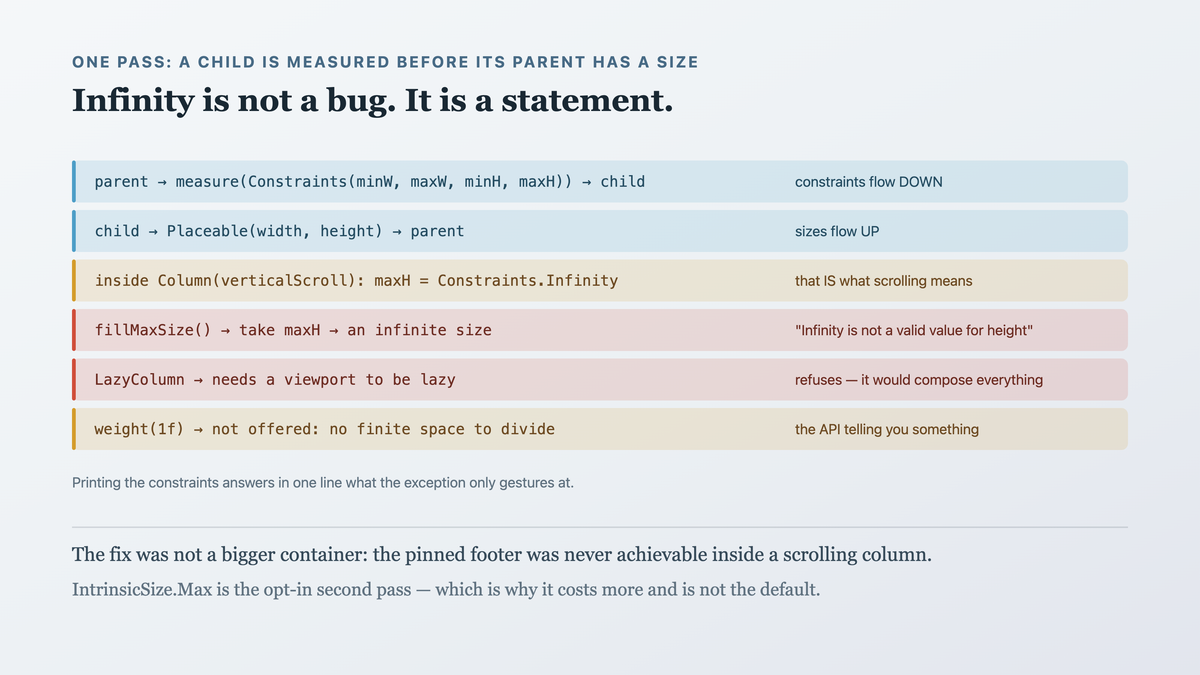
"Modifier.weight(1f) on the middle section." weight does not exist outside Row and
Column scope, and inside a scrollable Column there is no finite space to divide — so it is
not offered, which is the API telling you something.
The actual mechanism
Compose's layout is one pass, in three steps per node.
Constraints flow down. A parent calls measurable.measure(constraints) on each child, passing
Constraints(minWidth, maxWidth, minHeight, maxHeight). The parent decides what to pass — it may
narrow, loosen, or pass its own through.
Sizes flow up. The child returns a Placeable with a concrete width and height. It chose that
size within the constraints it was given.
The parent places children. Having measured everything, it knows its own size and positions each child.
Because there is exactly one pass, a child is measured before its parent has a final size. So "how much space is left?" is answerable only by the parent, and only by giving the child a constraint that encodes it.
Now the infinity:
A scrollable container passes maxHeight = Constraints.Infinity. That is what scrolling is —
"you may be as tall as you like, I will scroll". So a vertically scrolling Column tells its
children they have unbounded height.
fillMaxSize() means "take maxHeight". Given infinity, that is an infinite size, which is not
a number a layout can use. Hence the exception.
A LazyColumn must know its viewport height to decide which items to compose. Unbounded height
means it would have to compose everything, which defeats laziness — so it refuses.

Infinity in a constraint is not a bug, it is a statement: this axis is unbounded. The error is asking "how big is the remaining space" in a direction where the answer is deliberately "as big as you need".
And the side-by-side cards: a Row measures children with unbounded height by default, so each
card reports its own content height. Neither can know the other's — they are measured
independently, in one pass, with no mechanism to compare.
Except there is one, and it is worth understanding precisely because of what it costs.
IntrinsicSize is the sanctioned escape hatch: it asks children "what height would you like"
before the real measurement, so the parent can compare the answers and then measure both against
the larger:
Row(Modifier.height(IntrinsicSize.Min)) {    // ask first, then measure for real
    Card(Modifier.weight(1f).fillMaxHeight()) { ShortContent() }
    Card(Modifier.weight(1f).fillMaxHeight()) { TallContent()  }
}
The two cards now match, and fillMaxHeight() works here — where fillMaxSize() failed in the
scrolling case — because the Row is passing a bounded height derived from the intrinsic query.
The cost is that this is no longer one pass. Compose runs an intrinsic measurement over the subtree
first, so the children are walked twice, and every node in them has to answer the intrinsic
question. In a LazyColumn row that renders sixty times a scroll, that doubling is measurable;
used once on a two-card comparison, it is free.
So the one-pass rule is not absolute — it is the default, and IntrinsicSize buys an exception
at a price you should know you are paying. Reach for it when two siblings genuinely must agree, and
not as a general-purpose answer to "this didn't size the way I expected".
The fix
Each symptom has a different answer, because they are different questions.
For "fill the remaining space", stop scrolling the outer container:
@Composable
fun DetailScreen(item: Item) {
    Column(Modifier.fillMaxSize()) {        // bounded: fills the window
        Header(item)
        Box(Modifier.weight(1f)) {          // "the space left after header and footer"
            Body(item, Modifier.verticalScroll(rememberScrollState()))
        }
        Footer(item)                        // pinned, because the Column is bounded
    }
}
weight(1f) is the mechanism for "the remainder", and it works here precisely because the outer
Column has a finite height to distribute. Scrolling moved inside, where it belongs — the body
scrolls, the header and footer do not.
For a list with a header and footer, use the list's own slots rather than nesting:
LazyColumn(Modifier.fillMaxSize()) {
    item { Header(item) }
    items(item.comments, key = { it.id }) { CommentRow(it) }
    item { Footer(item) }
}
One scrolling container, and everything stays lazy. Nesting a LazyColumn in a scrolling Column
is almost always this, written differently.
And for matching sibling heights, use the intrinsic-measurement escape hatch:
Row(Modifier.height(IntrinsicSize.Max)) {       // measure children, take the max, THEN constrain
    Card(Modifier.weight(1f).fillMaxHeight()) { ShortContent() }
    Card(Modifier.weight(1f).fillMaxHeight()) { TallContent() }
}
IntrinsicSize.Max is the exception to one-pass that is worth knowing about: it performs an extra
query to ask children how tall they would like to be, takes the maximum, and then measures for real
with that as a fixed constraint. It is explicitly a second measurement, which is why it costs more
and why it is opt-in rather than the default.
The diagnostic habit that makes all of this tractable — print the constraints:
Modifier.layout { measurable, constraints ->
    println("constraints: $constraints")        // Constraints(0..1080, 0..Infinity)
    val p = measurable.measure(constraints)
    layout(p.width, p.height) { p.place(0, 0) }
}
Seeing maxHeight = Infinity in one line answers the question that the exception message only
hints at.
How we proved it
That the constraints were the cause, read directly rather than inferred:
inside Column(Modifier.verticalScroll(…))
  constraints: Constraints(minW=0, maxW=1080, minH=0, maxH=Infinity)

inside Column(Modifier.fillMaxSize())
  constraints: Constraints(minW=0, maxW=1080, minH=0, maxH=2148)
Two lines, and the exception explains itself.
That the footer is actually pinned:
@Test
fun footerStaysAtTheBottomWhileBodyScrolls() {
    composeTestRule.setContent { DetailScreen(longItem) }
    val footerBefore = composeTestRule.onNodeWithTag("footer").getBoundsInRoot().top

    composeTestRule.onNodeWithTag("body").performScrollToIndex(80)
    val footerAfter = composeTestRule.onNodeWithTag("footer").getBoundsInRoot().top

    assertEquals(footerBefore, footerAfter)      // did not move
}
before (outer scroll): FAILED — footer scrolled off-screen
after:                 PASSED
That test is worth more than fixing the crash, because the original design had the footer scrolling by construction — the crash was hiding a layout intent that was never achievable that way.
That the cards match, and did not both grow:
Row height, cards with 60dp and 140dp of content
  before:                       60dp and 140dp   (mismatched)
  with fillMaxHeight only:      1080dp each      (filled the screen)
  with IntrinsicSize.Max:       140dp each       ✓
The middle row is the one I would have shipped without measuring.
And that laziness is preserved in the single-container version:
80 comments, screen fits 9
  nested LazyColumn in scroll:  crash
  item{} + items{} + item{}:    9 CommentRow compositions
One limit: IntrinsicSize.Max adds a measurement pass, so it is genuinely more expensive — fine for
two cards, worth measuring inside a long list. And these numbers are from one screen size; the point
is the relationship between the three rows, not the dp values.
What this generalizes to
One pass is a strong constraint, and it shows up as "you cannot ask that". Any single-pass system — a streaming parser, a forward-only cursor, a one-shot layout engine — forbids questions whose answers are only available later. Recognising the shape tells you to restructure rather than to search for the missing API.
An error about an impossible value is usually about an unbounded dimension. Infinity, null
width, "unconstrained" — these are declarations that something is deliberately unlimited. The fix
is to find who made it unlimited and whether that was intended.
Read the inputs, not the error. Printing the constraints answered in one line what the exception message gestured at. For any layout or resolution problem, the inputs to the failing step are more informative than the failure.
A crash can hide a design mistake. The pinned footer was never going to work inside a scrolling column. Fixing the exception without noticing that would have produced working code with the wrong behaviour.
Related
- Modifier order is not style, it is semantics — the chain that feeds this pass
- Text is the most expensive composable you use without thinking — what measurement costs
- A LazyColumn without keys loses your scroll position and your animations — the list container in detail
Keep reading
This is part of 100 Days of Compose — the mechanisms underneath the API, measured rather than guessed. Follow MobileByteSensei for the rest.
One post a week, no digest
New writing when it lands. No roundups, no course pitch, no "10 tips".