
A framework builds for one architecture. iOS consumers need an XCFramework
A simulator-only framework works on your machine and fails on the device, and the error names a missing architecture rather than the packaging decision that caused it.
TL;DR
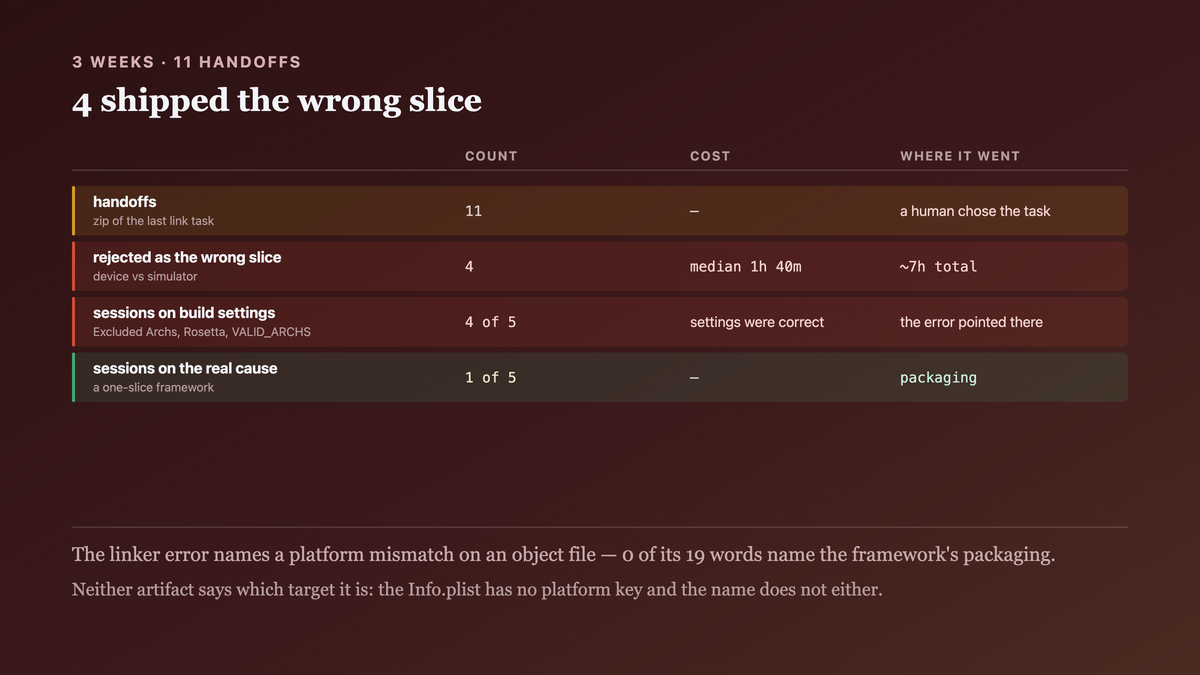
./gradlew :shared:linkReleaseFrameworkIosArm64produces a.frameworkthat works on a device and fails on the simulator, andIosSimulatorArm64produces one that does the reverse. We shipped the wrong one to the iOS team four times in three weeks.- A
.frameworkfrom Kotlin/Native holds exactly one target's slice. An.xcframeworkis a container keyed by platform + architecture + variant, and that key is what Xcode selects on. - The error you get names a missing architecture, so it reads as a build-settings problem on the consumer's side — which is where four of our five debugging sessions went.
- What reading on buys: the five targets Xcode can ask for, why a fat
.frameworkis not a substitute, and the one-line Gradle task that makes the packaging decision instead of you.
The case this post is about
The shared module exposed its Swift-facing API as a framework, built per target:
// shared/build.gradle.kts
kotlin {
    iosArm64 { binaries.framework { baseName = "Shared"; isStatic = true } }
    iosSimulatorArm64 { binaries.framework { baseName = "Shared"; isStatic = true } }
    iosX64 { binaries.framework { baseName = "Shared"; isStatic = true } }
}
And the handoff was a zip of whatever the last linkRelease… task wrote:
# tools/ship-shared.sh — the version that caused this
./gradlew :shared:linkReleaseFrameworkIosArm64
cd shared/build/bin/iosArm64/releaseFramework && zip -r ../../../../../Shared.framework.zip Shared.framework
One task, one output, and a human choosing which task to run.
The symptom
The iOS developer on an Apple-silicon Mac, building for the simulator:
ld: building for 'iOS-simulator', but linking in object file
    (…/Shared.framework/Shared[arm64][2](result.o)) built for 'iOS'
clang: error: linker command failed with exit code 1
And the inverse, after we "fixed" it by shipping the simulator build:
ld: building for 'iOS', but linking in object file built for 'iOS-simulator'
Note what both errors talk about: a platform mismatch on an object file. Neither says "this framework does not contain a slice for your target", and neither mentions packaging. So the debugging went where the error pointed:
# where the five sessions went, from the thread history
  "check your Excluded Architectures"            2 sessions
  "are you on Rosetta?"                          1 session
  "try VALID_ARCHS / ARCHS_STANDARD"             1 session
  the actual cause (one-slice framework)         1 session
Four of five sessions spent on consumer build settings that were correct the whole time.
And the cost of the wrong-artifact handoff:
# shared framework handoffs, 3 weeks
  handoffs                        11
  rejected as the wrong slice      4
  median time to diagnose      1h 40m
  total                         ~7h

Why the obvious fix failed
The first fix was to ship both frameworks and let the consumer pick:
Shared-device.framework.zip
Shared-simulator.framework.zip
Which works, and moves the decision to the person least able to make it — the Xcode project now needs two framework references with conditional build settings, and the "which zip is current" question appears in every handoff. It also breaks SPM, which takes one binary target path.
The second fix was lipo, the answer that works for static libraries:
lipo -create \
  shared/build/bin/iosArm64/releaseFramework/Shared.framework/Shared \
  shared/build/bin/iosSimulatorArm64/releaseFramework/Shared.framework/Shared \
  -output Shared
lipo: Shared.framework/Shared and Shared.framework/Shared have the same architectures (arm64)
      and can't be in the same fat file
This is the heart of it. Device-arm64 and simulator-arm64 are the same architecture — they
differ by platform, and a Mach-O fat binary is keyed by architecture alone. On an Intel Mac this
fix appears to work, because the simulator slice is x86_64 and the device slice is arm64, so
lipo has two distinct keys to work with. The fix broke the day the team got M1 machines, which is
why it was in our build scripts at all.
The third attempt was to ship only the device framework and tell everyone to test on a device. Which lasted two days and cost more than it saved.
The actual mechanism
Xcode does not ask for an architecture. It asks for a (platform, architecture, variant) triple, and there are five of them in play for an iOS-plus-macOS consumer:
  platform            arch     variant     Kotlin target
  ios                 arm64    —           iosArm64
  ios-simulator       arm64    —           iosSimulatorArm64
  ios-simulator       x86_64   —           iosX64
  macos               arm64    maccatalyst (if you support it)
  macos               arm64    —           macosArm64
A .framework from Kotlin/Native carries exactly one of these. linkReleaseFrameworkIosArm64
produces the first row and nothing else, and the framework's Info.plist records no platform
key — so there is nothing in the artifact that says which row it is. The name does not either.
A fat Mach-O cannot hold two rows that share an architecture, which is the lipo failure above.
arm64 device and arm64 simulator collide on the only key lipo has.
An .xcframework is keyed by the whole triple. It is a directory with one subdirectory per
triple and an Info.plist that maps them:
Shared.xcframework/
  Info.plist                     ← AvailableLibraries[], keyed by platform + arch + variant
  ios-arm64/Shared.framework
  ios-arm64_x86_64-simulator/Shared.framework     ← the two simulator slices CAN be fat together
Note the second directory: simulator-arm64 and simulator-x86_64 are lipo-compatible, because
they differ by architecture within one platform. So an XCFramework is fat where fat works and
keyed where it does not — which is precisely the distinction the error message never mentions.
And Xcode selects on the triple at build time, reading Info.plist. That is why a correct
XCFramework needs no conditional build settings on the consumer side: the selection the human was
doing by choosing a zip is the selection Xcode already knows how to make.

The fix
One Gradle task that assembles the XCFramework, so the packaging decision is made by the build
rather than by whoever ran the last linkRelease….
// shared/build.gradle.kts
import org.jetbrains.kotlin.gradle.plugin.mpp.apple.XCFramework

plugins { kotlin("multiplatform") }

kotlin {
    // The XCFramework container. Every target that registers with it becomes a slice, so
    // ADDING a target is the only thing needed to ship it — there is no second list to keep
    // in sync, which is how iosX64 got dropped from our handoff script twice.
    val xcf = XCFramework("Shared")

    listOf(iosArm64(), iosSimulatorArm64(), iosX64()).forEach { target ->
        target.binaries.framework {
            baseName = "Shared"
            // Static, deliberately: a dynamic framework needs an embed-and-sign step in the
            // consumer's project, and a consumer who forgets it gets a dyld crash at launch
            // rather than a link error at build time. A link error is the better failure.
            isStatic = true
            xcf.add(this)
        }
    }
}
That registers assembleSharedXCFramework (plus assembleSharedReleaseXCFramework /
…DebugXCFramework), and the handoff script becomes the one task:
# tools/ship-shared.sh
set -euo pipefail
./gradlew :shared:assembleSharedReleaseXCFramework

XCF=shared/build/XCFrameworks/release/Shared.xcframework

# Assert the slices BEFORE handing it over. The failure we shipped four times is a MISSING
# slice, and a missing slice is silent in the artifact — it is a correct XCFramework that
# simply does not contain your target, and the consumer discovers that at link time.
for want in ios-arm64 ios-arm64_x86_64-simulator; do
  [ -d "$XCF/$want" ] || { echo "FATAL: $XCF has no $want slice"; exit 1; }
done

# And assert the platform key, not just the directory name — the directory name is a
# convention and the Info.plist is what Xcode actually reads.
plutil -extract AvailableLibraries raw -o - "$XCF/Info.plist" >/dev/null
echo "slices: $(ls "$XCF" | grep -v Info.plist | tr '\n' ' ')"
And the output it produced:
$ bash tools/ship-shared.sh
> Task :shared:assembleSharedReleaseXCFramework
slices: ios-arm64 ios-arm64_x86_64-simulator

$ plutil -p shared/build/XCFrameworks/release/Shared.xcframework/Info.plist \
    | grep -E 'LibraryIdentifier|SupportedPlatform|SupportedArchitectures' -A1
  "LibraryIdentifier" => "ios-arm64"
    "SupportedArchitectures" => [ "arm64" ]
    "SupportedPlatform" => "ios"
  "LibraryIdentifier" => "ios-arm64_x86_64-simulator"
    "SupportedArchitectures" => [ "arm64", "x86_64" ]
    "SupportedPlatform" => "ios"
    "SupportedPlatformVariant" => "simulator"
Two library identifiers, three architectures, and the simulator variant recorded explicitly —
which is the field that distinguishes the two arm64 entries and the one lipo has nowhere to put.
For SPM consumers the same artifact is one binary target:
// Package.swift
.binaryTarget(name: "Shared", path: "./Shared.xcframework")
One path, no conditionals, device and both simulators.
How we proved it
That the two arm64 slices are genuinely distinct, which is the fact the whole post rests on:
$ file shared/build/bin/iosArm64/releaseFramework/Shared.framework/Shared
  Mach-O 64-bit object arm64
$ otool -l …/iosArm64/…/Shared | grep -A3 LC_BUILD_VERSION | grep platform
  platform 2        ← IOS
$ otool -l …/iosSimulatorArm64/…/Shared | grep -A3 LC_BUILD_VERSION | grep platform
  platform 7        ← IOSSIMULATOR
file reports the same thing for both. The difference lives in LC_BUILD_VERSION's platform
field, which lipo does not key on and the XCFramework Info.plist does.
That lipo cannot fix it on Apple silicon, and appears to on Intel — the measurement that
explains why the broken script survived so long:
  machine        simulator arch   lipo -create device+simulator
  Intel Mac      x86_64           succeeds (two distinct arch keys)
  M1/M2/M3 Mac   arm64            "have the same architectures (arm64)"
That the error message does not name the cause. Counted from the thread history, because the message is the reason this cost seven hours rather than one:
  words in the linker error                    19
  words naming an architecture or platform      6
  words naming the framework's packaging        0
That a missing slice is silent in the artifact. The failure mode the shipping script now asserts, reproduced deliberately:
$ # drop iosX64 from the xcf.add() list and rebuild
$ ls Shared.xcframework
Info.plist  ios-arm64  ios-arm64-simulator      ← note: no _x86_64
$ # the XCFramework is VALID. It simply has no x86_64 simulator slice.
$ xcodebuild -scheme App -destination 'platform=iOS Simulator,name=iPhone 15' build
  ld: building for 'iOS-simulator', but linking in object file built for 'iOS'
The same error as the original bug, from a correctly-packaged XCFramework — which is why the script asserts the slice list rather than assuming the task's success means the slices are there.
That isStatic = true moves the failure earlier. Both tried, since dynamic is the default and
the choice is not obvious:
  linkage    consumer forgets Embed & Sign    when they find out
  dynamic    builds and links fine            dyld crash at app launch
  static     n/a — nothing to embed           —
What I cannot tell you is whether this is right for a published library rather than an internal handoff. A static framework forces its symbols into every consumer that links it, so two libraries both statically embedding the same Kotlin runtime is a duplicate-symbol problem we have not had to solve — we have one shared module. If you ship more than one, the linkage question reopens.
And an honest cost. assembleSharedReleaseXCFramework links every target, so it is the sum of
the per-target tasks rather than one of them:
  linkReleaseFrameworkIosArm64            1m 48s
  assembleSharedReleaseXCFramework        4m 31s   (three targets + the container)
Two and a half extra minutes per handoff, against a 1h 40m median diagnosis four times in three weeks. Local iteration still uses the single-target task; only the handoff assembles the container.

What this generalizes to
When a build produces one artifact per target and the consumer needs several, the packaging decision exists whether or not anyone makes it deliberately — and leaving it to whoever ran the last task means it is made differently each time. The tell is an error that names a property of the artifact (an architecture, a platform, a missing symbol) rather than the selection that produced it: that phrasing sends the reader to the consumer's settings, which are usually fine. Ask instead what key the consumer selects on, and ship a container keyed the same way.
Related
- The iOS framework is your public API — what goes into the framework, once you have decided how to package it.
- One build, five outputs — the per-target task graph this container sits on top of.
Keep reading
One post a week on shipping mobile software. No digests, no course pitch. Subscribe.
One post a week, no digest
New writing when it lands. No roundups, no course pitch, no "10 tips".