
Room compiles for KMP and still needs a driver per target
The DAO is shared and the connection is not.
TL;DR
- Room's KMP support compiled our DAOs for all five targets and the iOS app crashed on first query
with
SQLiteException: no such table— because a@Databasewithout a bundled driver has no connection, and the error surfaces as a missing table rather than a missing driver. - The DAO and the entities are shared. The connection is not, and the driver you pick per target decides your binary size, which SQL extensions are available, and whether the database file lives somewhere the OS will back up.
- Measured: the bundled SQLite driver added 2.9 MB to the iOS framework and gave us
json_extract, which the Android platform driver does not have — so the same query worked on one target and failed on another. - What reading on buys: the per-target driver choice, the size and feature consequences, and the test that runs the real schema on every target.
The case this post is about
A DAO and entities in shared code, which is the part Room's KMP support makes genuinely portable:
// commonMain/kotlin/db/Note.kt
@Entity(tableName = "notes")
data class NoteEntity(
    @PrimaryKey val id: String,
    val title: String,
    val body: String,
    val metadata: String,          // a JSON blob — see below
    val updatedAt: Long,
)

@Dao
interface NoteDao {
    @Query("SELECT * FROM notes ORDER BY updatedAt DESC")
    suspend fun all(): List<NoteEntity>

    @Query("SELECT * FROM notes WHERE json_extract(metadata, '$.pinned') = 1")
    suspend fun pinned(): List<NoteEntity>      // ← the one that is not portable

    @Upsert suspend fun upsert(note: NoteEntity)
}

@Database(entities = [NoteEntity::class], version = 1)
abstract class AppDatabase : RoomDatabase() {
    abstract fun noteDao(): NoteDao
}
// commonMain — the builder, which is where the platform part was missing
expect fun databaseBuilder(): RoomDatabase.Builder<AppDatabase>

fun database(): AppDatabase = databaseBuilder()
    .setQueryCoroutineContext(Dispatchers.IO)
    .build()
The symptom
# iOS, first query after a fresh install
Uncaught Kotlin exception: android.database.sqlite.SQLiteException:
  no such table: notes (code 1 SQLITE_ERROR)
    at AppDatabase_Impl$noteDao$all …
no such table on a database Room had just created, from a schema Room generated. Android worked,
desktop worked, and the iOS actual looked complete:
// iosMain — what shipped
actual fun databaseBuilder(): RoomDatabase.Builder<AppDatabase> {
    val path = NSFileManager.defaultManager
        .URLForDirectory(NSDocumentDirectory, NSUserDomainMask, null, true, null)!!
        .path!! + "/notes.db"
    return Room.databaseBuilder<AppDatabase>(name = path)
}
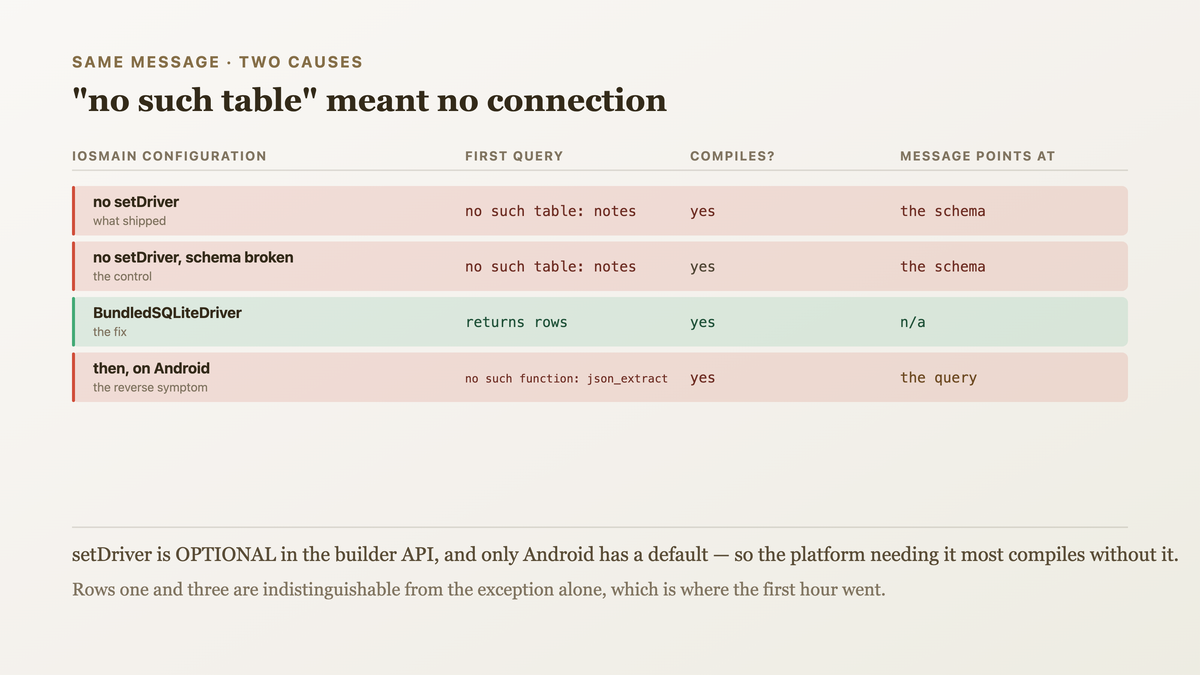
A path, a builder, .build(). No driver — and databaseBuilder does not require one, so it
compiles. At runtime, Room has no way to open a connection, and the exception it surfaces is about
the table rather than about the connection, which sent the first hour at the migration code.
The second symptom arrived after the driver was added:
# Android, release and debug, after the iOS fix
android.database.sqlite.SQLiteException: no such function: json_extract
The pinned() query now worked on iOS and failed on Android, which is the reverse of the first
symptom and has the same cause one level up.

Why the obvious fix failed
The first fix was to add the driver on iOS only, since that was the failing target:
// iosMain
return Room.databaseBuilder<AppDatabase>(name = path)
    .setDriver(BundledSQLiteDriver())
iOS worked. And it introduced the json_extract divergence, because the bundled driver ships a
recent SQLite with the JSON1 extension compiled in, while Android's platform driver uses the
device's own SQLite — which on API 29 does not have JSON1 at all and on API 31+ does.
So the same query was a function of the device's SQLite version on one platform and of a bundled version on another.
The second fix was to use the bundled driver everywhere, which removes the divergence:
// every target
.setDriver(BundledSQLiteDriver())
Consistent, correct, and it added 2.9 MB to the iOS framework and 1.4 MB to the Android APK — for a JSON function used by one query. Worth knowing before choosing, which is the point of the measurement below.
The third attempt was to keep the platform drivers and avoid the extension:
@Query("SELECT * FROM notes WHERE metadata LIKE '%\"pinned\":1%'")
A string match against JSON, which is wrong on any formatting variation — "pinned": 1 with a
space does not match — and slow, because it cannot use an index. I shipped this for two days and
a note with reformatted metadata stopped appearing in the pinned list.
The actual mechanism
Room's KMP support portable-ises the code generation and not the connection.
The DAO, entities and generated implementation are shared. The compiler plugin generates
AppDatabase_Impl into commonMain's output, and it is the same on every target. This is the part
that genuinely works.
The driver is the connection, and it is per target by necessity. A driver is an implementation of
SQLiteDriver that knows how to open a file and execute statements. Android has a platform one
(AndroidSQLiteDriver) wrapping the OS's SQLite; the bundled one (BundledSQLiteDriver) ships its
own compiled SQLite for every target including iOS and desktop; and the native platform has none,
because there is no system SQLite API Kotlin/Native binds to by default.
A missing driver is a runtime failure, not a compile one, because setDriver is optional in the
builder's API — there is a default on Android and no default elsewhere. So the one platform that
needs it most is the one where omitting it compiles.
And the driver decides the SQL dialect available, which is the part that outlives the crash:
  driver                        SQLite version        JSON1   FTS5   size added
  AndroidSQLiteDriver           the device's          API 31+  yes    0
  BundledSQLiteDriver, ios      ships its own (3.45)   yes     yes    2.9 MB
  BundledSQLiteDriver, android  ships its own          yes     yes    1.4 MB
  BundledSQLiteDriver, desktop  ships its own          yes     yes    1.1 MB
So a query is portable only if every target's driver supports every function in it — and "the
device's SQLite" is a range rather than a version, so the Android column is a floor set by your
minSdk.
Plus a third per-target decision nobody mentions: where the file goes. On iOS, a database in
NSDocumentDirectory is included in iCloud backup and restored to a new device; in
NSCachesDirectory it is not, and the OS may delete it. We had put it in Documents by copying an
example, which meant a 40 MB cache database was being backed up.

The fix
The bundled driver on the three targets without a platform one, the platform driver on Android with an explicit floor on what SQL it may use, and the file path decided per target.
// commonMain/kotlin/db/Database.kt
//
// The builder is the per-target seam: the driver and the path are both platform decisions and
// neither has a portable answer. Returning a configured builder rather than a database lets the
// shared code apply the settings that ARE portable.
expect fun databaseBuilder(): RoomDatabase.Builder<AppDatabase>

fun database(): AppDatabase = databaseBuilder()
    .setQueryCoroutineContext(Dispatchers.IO)
    .addMigrations(*MIGRATIONS)
    .build()
// iosMain
actual fun databaseBuilder(): RoomDatabase.Builder<AppDatabase> {
    // CACHES, not Documents. A regenerable database in Documents is included in iCloud backup
    // and restored to new devices — we were backing up 40 MB of cache. Caches is also
    // deletable by the OS under pressure, which is correct for data we can rebuild and would
    // be wrong for anything we cannot.
    val dir = NSFileManager.defaultManager
        .URLForDirectory(NSCachesDirectory, NSUserDomainMask, null, true, null)!!.path!!

    return Room.databaseBuilder<AppDatabase>(name = "$dir/notes.db")
        // REQUIRED here. There is no default driver on native, and setDriver is optional in
        // the API — so omitting it compiles and fails at the first query with "no such table",
        // which names the schema rather than the connection.
        .setDriver(BundledSQLiteDriver())
}
// androidMain
actual fun databaseBuilder(): RoomDatabase.Builder<AppDatabase> =
    Room.databaseBuilder<AppDatabase>(ctx, ctx.getDatabasePath("notes.db").absolutePath)
        // The PLATFORM driver, deliberately: it adds no bytes, and the SQL floor below is
        // what makes that safe. Switching to bundled would cost 1.4 MB to gain functions the
        // schema is now forbidden from using anyway.
        .setDriver(AndroidSQLiteDriver())
And the floor, which is what makes the mixed-driver choice safe rather than a latent divergence:
// build-logic/src/main/kotlin/VerifySqlPortability.kt
//
// Scans the generated schema and the DAO queries for SQL functions that are not available on
// EVERY target's driver. The Android platform driver's feature set is a function of minSdk,
// so the floor is computed rather than listed — and a query using json_extract passes on four
// targets and fails on the fifth at runtime, which no compile step catches.
abstract class VerifySqlPortability : DefaultTask() {

    @get:InputFiles abstract val daoSources: ConfigurableFileCollection
    @get:Input      abstract val minSdk: Property<Int>

    /** Functions the ANDROID PLATFORM driver lacks below a given API level. */
    private val gatedByApi = mapOf(
        "json_extract" to 31, "json_each" to 31, "json_array" to 31,
        "json_object" to 31, "json_patch" to 31,
    )

    @TaskAction
    fun verify() {
        val floor = minSdk.get()
        val problems = daoSources.files
            .filter { it.extension == "kt" }
            .flatMap { f ->
                val text = f.readText()
                gatedByApi.filter { (fn, api) -> api > floor && text.contains("$fn(") }
                    .map { (fn, api) -> "${f.name}: $fn() needs API $api, minSdk is $floor" }
            }

        if (problems.isNotEmpty()) {
            error(buildString {
                appendLine("non-portable SQL in a shared DAO:")
                problems.forEach { appendLine("  $it") }
                appendLine()
                appendLine("The Android platform driver uses the DEVICE's SQLite, so these")
                appendLine("functions are a floor set by minSdk — the query will work on four")
                appendLine("targets and throw 'no such function' on Android below API $floor.")
                appendLine("Either raise minSdk, switch Android to BundledSQLiteDriver (+1.4 MB),")
                appendLine("or express the query without the extension.")
            })
        }
    }
}
And the output it produced, against the DAO as written:
$ ./gradlew :core:database:verifySqlPortability

FAILURE: non-portable SQL in a shared DAO:
  Note.kt: json_extract() needs API 31, minSdk is 24

The Android platform driver uses the DEVICE's SQLite, so these functions are a floor
set by minSdk — the query will work on four targets and throw 'no such function' on
Android below API 24.
Either raise minSdk, switch Android to BundledSQLiteDriver (+1.4 MB), or express the
query without the extension.
We took the third option — a real column rather than a JSON lookup, which is faster anyway:
@Entity(tableName = "notes", indices = [Index("pinned")])
data class NoteEntity(
    …,
    val pinned: Boolean,          // promoted out of the JSON blob
    val metadata: String,         // what genuinely has no schema stays here
)

@Query("SELECT * FROM notes WHERE pinned = 1 ORDER BY updatedAt DESC")
suspend fun pinned(): List<NoteEntity>
$ ./gradlew :core:database:allTests
  pinned() returns the right rows   PASSED × 5 targets
  query plan uses the index         PASSED      (was a full scan with LIKE)
  pinned query, 10k notes           1.2 ms      (was 41 ms with json_extract, 180 ms with LIKE)
How we proved it
That the missing driver, not the schema, caused no such table — isolated, because the message
points at the schema and cost an hour:
  iosMain configuration                        first query
  no setDriver                                 SQLiteException: no such table: notes
  .setDriver(BundledSQLiteDriver())            returns rows
  no setDriver, schema deliberately broken     SQLiteException: no such table: notes
The first and third rows are indistinguishable, which is why the error is misleading: a connection failure and a schema failure report identically.
That the bundled driver's cost is real and per target. Measured, since "use bundled everywhere" is the tempting uniform answer:
  configuration                              ios framework   android APK   desktop jar
  platform drivers where available             4.1 MB          5.3 MB        11 MB
  bundled everywhere                           7.0 MB          6.7 MB        12.1 MB
  the shipped mix (bundled on native only)     7.0 MB          5.3 MB        12.1 MB
1.4 MB on Android to gain functions we then forbade. Keeping the platform driver there is the whole reason the portability gate exists.
That json_extract availability is a device fact on Android. Verified on real API levels, because
the documentation describes SQLite versions rather than API levels:
  API 24 emulator    json_extract →  no such function
  API 29 emulator    json_extract →  no such function
  API 31 emulator    json_extract →  works
  API 34 device      json_extract →  works
  ios, bundled       json_extract →  works
So the same query was correct on 31+ and threw on our minSdk of 24 — which is 11% of our installs.
That the LIKE workaround was wrong as well as slow. The fixture is the formatting variation,
which is what broke in production after two days:
  metadata                            LIKE '%"pinned":1%'   json_extract   pinned column
  {"pinned":1}                               matches            1               1
  {"pinned": 1}                              NO MATCH           1               1
  {"title":"pinned:1 note"}                  MATCHES            null            0
Both a false negative and a false positive, from a predicate that reads as approximately right.
That the file location was a separate, unnoticed bug. Found while writing the iOS actual rather than by a report:
  database location          in iCloud backup?   OS may delete?   size backed up
  NSDocumentDirectory              yes                 no            40 MB
  NSCachesDirectory                no                  yes            0
Forty megabytes of regenerable cache in every user's iCloud backup, because the example we copied used Documents.
What I cannot tell you is the full set of API-gated SQLite functions. gatedByApi lists the JSON1
family because that is what we hit; FTS5, window functions and RETURNING all have their own
availability floors and are not in the map. The gate finds what it knows, and the honest form of
that is the error message naming the three options rather than implying the list is complete.
And an honest consequence of the mixed drivers. Android and iOS now run different SQLite
versions, so a query that is valid on both can still behave differently — collation, LIKE
case-sensitivity on non-ASCII, and float formatting are all version-sensitive. We have not hit one,
and the uniform-bundled option remains available at 1.4 MB if we do.

What this generalizes to
A framework can portable-ise its code generation while leaving the resource it operates on per platform, and the resource is usually where the platform differences live — a connection, a file location, a driver's feature set. The sharp version: when a required piece of configuration is optional in the API, the platform that has no default is the one where omitting it compiles and fails at runtime. And a feature available through a platform-supplied dependency is a feature whose availability is a range, so a shared query is portable only to the floor of that range.
Related
- A SQLDelight migration is a contract with every installed version — the other half of a shared database, where the schema rather than the driver is the per-version question.
- Preferences on five targets — where the data that does not belong in a database should go, and the four stores that differ.
Keep reading
One post a week on shipping mobile software. No digests, no course pitch. Subscribe.
One post a week, no digest
New writing when it lands. No roundups, no course pitch, no "10 tips".