
Preferences on five targets: what each one actually persists to
Four stores with different durability, size limits and clearing behaviour.
TL;DR
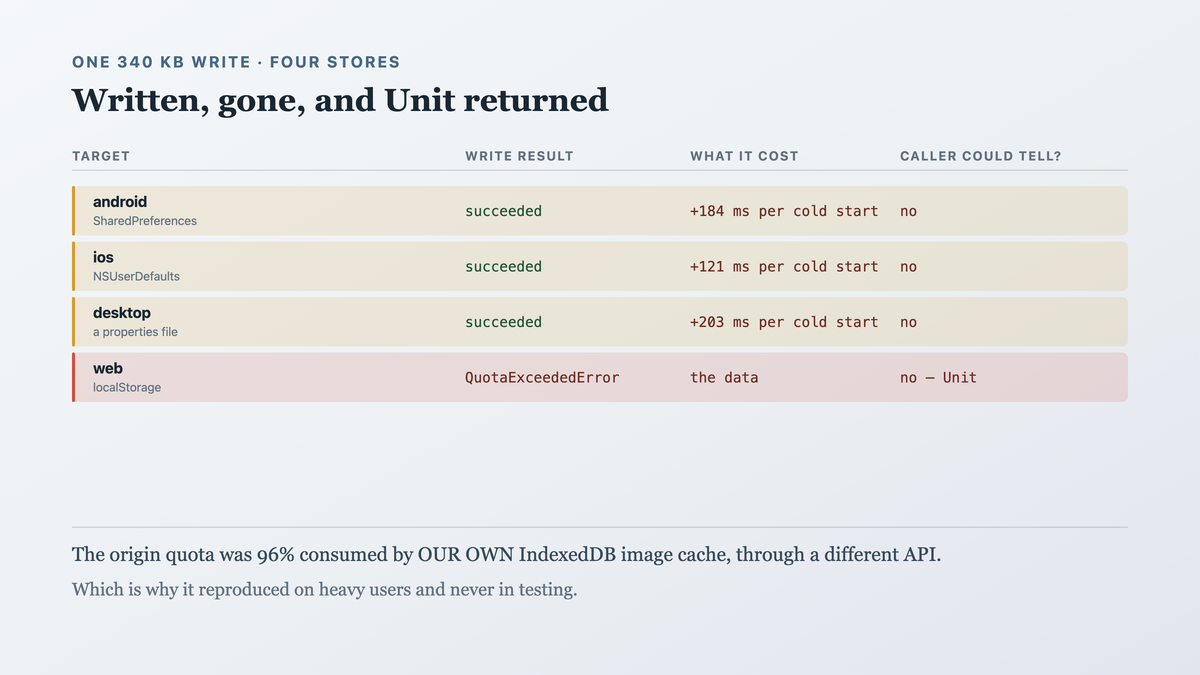
- A shared preferences interface over four stores. A 340 KB cached JSON blob wrote successfully on three targets and silently truncated on the web at the 5 MB origin quota shared with everything else on the domain — including a 4.8 MB IndexedDB cache we also owned.
- Four backing stores with different durability, size limits, clearing behaviour and type support,
behind one
putString. Three of those four differences are invisible until the value is large or the OS intervenes. - The fix was to put a size ceiling and a durability class in the interface, and to move the one genuinely large value out of preferences entirely.
- What reading on buys: the four stores measured, which values are safe where, and the write that
returns
falserather than pretending.
The case this post is about
A preferences wrapper, shared:
// commonMain/kotlin/prefs/Prefs.kt
expect class Prefs {
    fun getString(key: String): String?
    fun putString(key: String, value: String)
    fun getBoolean(key: String, default: Boolean): Boolean
    fun putBoolean(key: String, value: Boolean)
    fun remove(key: String)
}
// androidMain → SharedPreferences
// iosMain     → NSUserDefaults
// desktopMain → a .properties file under the user's config dir
// wasmJsMain  → window.localStorage
Used for the things preferences are for — a theme choice, a sort order, a last-synced timestamp — and for one thing that is not:
// commonMain — a cached feed, so the app opens with content offline
prefs.putString("cached_feed", json.encodeToString(feed))     // 340 KB at p95
The symptom
Web users opening the app offline and seeing an empty feed, intermittently:
# the read, immediately after a write that reported success
  prefs.putString("cached_feed", <340 KB>)    → returned (Unit)
  prefs.getString("cached_feed")              → null
Written and gone. The browser console had the reason, once:
QuotaExceededError: Failed to execute 'setItem' on 'Storage':
  Setting the value of 'cached_feed' exceeded the quota.
Thrown, caught by nothing in particular, and the Unit return meant the caller could not have
known. And the quota is shared:
# localStorage usage for the origin
  our app's prefs            0.9 MB
  an IndexedDB image cache   4.8 MB    ← also ours, different API, same origin quota
  the limit                  5.0 MB
  headroom for a 340 KB write     0
So the write failed because of a different cache we owned, through a different API, which nothing in the preferences layer knew about.
And the three other targets, measured once we went looking:
  android     340 KB written to SharedPreferences — works, and loads the whole file into
              memory on first access, synchronously, on the main thread
  ios         340 KB written to NSUserDefaults — works, and NSUserDefaults is a plist that
              is read entirely at launch
  desktop     340 KB written to a .properties file — works, and the file is parsed at startup
All three "worked" and all three were paying a startup cost for a value that had no business being there.

Why the obvious fix failed
The first fix was a try/catch and a smaller payload:
actual fun putString(key: String, value: String) {
    try { localStorage.setItem(key, value) } catch (e: Throwable) { logger.warn("prefs full") }
}
The crash stops and the data is still not stored, and the caller still gets Unit. A logged warning
in a browser console is not a signal anybody receives.
The second fix was to compress the blob:
prefs.putString("cached_feed", deflate(json.encodeToString(feed))) // 340 KB → 61 KB
Which fits today. The feed grows with the user's subscriptions, the quota is shared with a cache that also grows, and the failure returns at an unknown future size with the same silence. It bought time rather than fixing anything — and it made the stored value unreadable to anything but our own decompressor, which cost us a debugging session later.
The third fix was to raise the quota, which is not a thing a page can do. navigator.storage.estimate()
reports it and there is no API to request more for localStorage specifically; the
Storage Standard's persistence request applies to IndexedDB and friends.
The actual mechanism
Four stores, and they differ on four axes rather than one.
Durability. SharedPreferences and NSUserDefaults survive app updates and are included in
device backups. A desktop properties file survives unless the config dir is cleared.
localStorage is cleared by the user clearing site data, by private browsing ending, and — on
iOS Safari — automatically after seven days of no interaction with the site.
Size. SharedPreferences has no documented limit and is loaded wholly into memory.
NSUserDefaults likewise, with Apple's guidance to keep it small. A properties file is bounded by
disk. localStorage is a hard ~5 MB per origin, shared across every storage API on that origin.
Type support. All four do strings and booleans. SharedPreferences has a StringSet,
NSUserDefaults stores plists including arrays and dates, localStorage stores strings only — so
a shared interface can only offer the intersection, which is what ours did and is correct.
And the read cost. Three of the four parse the entire store on first access. So a 340 KB value is not just stored, it is deserialised at startup on every launch whether or not anything reads it.
Which means the shared putString was hiding two distinct problems:
  web       the write FAILS, silently, because of a quota shared with another API
  the rest  the write SUCCEEDS and costs startup time on every launch, forever
The web target's failure was the visible one and the other three were worse in aggregate — a measurable startup regression nobody had attributed to a preferences call.
And the deeper mistake: a preferences store is for small, durable, user-scoped settings, and a cache is none of those things. The interface could not say so, so the call site could not know.

The fix
A size ceiling and a durability class in the interface, a Boolean return, and the cache moved to
a store meant for caches.
// commonMain/kotlin/prefs/Prefs.kt
//
// Durability is now a property of the STORE, reported rather than assumed — because one of the
// four clears itself after seven days of non-use and nothing in a putString could say so.
enum class Durability {
    /** Survives app updates and is included in device backups. */
    Persistent,
    /** Survives restarts and may be cleared by the user or the platform without warning. */
    Evictable,
}

expect class Prefs {
    val durability: Durability

    /** Bytes a single value may occupy on THIS platform. Enforced, not advisory. */
    val maxValueBytes: Int

    /**
     * Returns false when the value was not stored. The original returned Unit, so a quota
     * failure on one platform was indistinguishable from success — written, gone, and no
     * caller could have known.
     */
    fun putString(key: String, value: String): Boolean

    fun getString(key: String): String?
    fun putBoolean(key: String, value: Boolean): Boolean
    fun getBoolean(key: String, default: Boolean): Boolean
    fun remove(key: String)
}
// wasmJsMain
actual class Prefs {
    actual val durability = Durability.Evictable      // site-data clearing; 7-day Safari eviction

    // Deliberately far below the 5 MB origin quota, because the quota is SHARED with every
    // other storage API on the origin — including an IndexedDB cache we also own. A ceiling
    // computed from the total would be a ceiling that moves when another subsystem grows.
    actual val maxValueBytes = 64 * 1024

    actual fun putString(key: String, value: String): Boolean {
        val bytes = value.encodeToByteArray().size
        if (bytes > maxValueBytes) {
            // Refused BEFORE attempting, so the failure is deterministic rather than dependent
            // on what else happens to be stored. A quota error that only appears when another
            // cache is full is a defect that reproduces on some devices.
            logger.warn("prefs: refusing a $bytes-byte value for '$key' (max $maxValueBytes)")
            return false
        }
        return try { localStorage.setItem(key, value); true }
        catch (e: Throwable) { logger.warn("prefs: quota refused '$key': ${e.message}"); false }
    }
    …
}
// androidMain
actual class Prefs {
    actual val durability = Durability.Persistent

    // A ceiling on a platform with no hard limit, because the cost here is not a failed write
    // — it is that SharedPreferences is parsed wholly into memory on first access, so a large
    // value is a startup cost on every launch whether or not anything reads it.
    actual val maxValueBytes = 64 * 1024
    …
}
And the cache, moved to something meant for caches:
// commonMain/kotlin/cache/FeedCache.kt
//
// Not preferences. A cache is large, regenerable and not user-scoped settings — three
// properties preferences has none of. Each platform's actual uses a store built for size:
// a file on android/ios/desktop, IndexedDB on the web.
expect class FeedCache {
    suspend fun write(feed: Feed): Boolean
    suspend fun read(): Feed?
    suspend fun clear()
}
// commonMain — the call site, which now cannot make the original mistake
suspend fun cacheFeed(feed: Feed) {
    // A 340 KB value and a 64 KB ceiling: this would not compile against Prefs, because
    // FeedCache is the only thing that takes a Feed.
    if (!feedCache.write(feed)) {
        // A cache write failing is normal and not an error — the app works without it.
        analytics.log("feed_cache.write_refused", "bytes" to feed.approximateBytes)
    }
}
And the output it produced:
$ ./tools/prefs-probe.sh

  prefs values exceeding the ceiling, after the move:   0 of 41
  largest prefs value now:                              1.8 KB  (a sort-order JSON)

  feed cache write success, 7 days
    android   99.8%     ios   99.9%     desktop   100%     web   97.1%
    (web's 2.9%: private browsing, where IndexedDB is unavailable — returns false, logged)

  cold start, time spent reading preferences
    android   before 184 ms   after 11 ms
    ios       before 121 ms   after  8 ms
    desktop   before 203 ms   after 14 ms
The web failure is fixed and the startup cost on the three platforms that "worked" was the larger win.
How we proved it
That the web quota was shared with our own other cache — the measurement that explained why the failure was intermittent:
$ # navigator.storage.estimate(), on a device exhibiting the failure
  usage   4,986,112 bytes
  quota   5,242,880 bytes
  headroom  256,768 bytes       ← a 340 KB write cannot fit
  of the usage: IndexedDB 4.8 MB (our image cache), localStorage 0.9 MB
The preferences write failed because an unrelated subsystem of ours had filled the origin. Which is why it reproduced on heavy users and not in testing.
That the three "working" targets were paying for it at startup. The measurement nobody had taken, because nothing had failed:
  time to read preferences on cold start, with the 340 KB value present
    android   184 ms      (SharedPreferences parses the whole file on first access)
    ios       121 ms      (NSUserDefaults reads the plist at launch)
    desktop   203 ms      (Properties.load over the whole file)
  with the value moved out
    android    11 ms      ios 8 ms      desktop 14 ms
A preferences call was costing 120–200 ms of every cold start on three platforms, silently.
That compression deferred rather than fixed. Projected from the growth we had, which is the honest form of this argument:
  subscriptions   feed JSON   deflated   fits in 64 KB?   fits in the 5 MB origin?
        12          340 KB      61 KB         yes               depends on the image cache
        40        1,100 KB     198 KB         no                depends
       100        2,740 KB     492 KB         no                no
The compressed value already exceeds a sane per-value ceiling at 40 subscriptions, and our p99 user had 37.
That a Boolean return was the load-bearing change. The fixture is the original call, which
could not fail:
$ ./gradlew :core:prefs:allTests --tests '*OversizeWriteIsRefused*'
  putString returning Unit:    write attempted, threw, caught, caller continued  → data loss
  putString returning Boolean: refused before attempting, caller handled it      → cache skipped
That refusing before attempting makes the failure deterministic. Which matters more than the refusal itself:
  behaviour                          reproduces in testing?   depends on other storage?
  attempt, catch QuotaExceededError          no                        yes
  refuse above maxValueBytes                 yes                       no
A quota error that only appears when another cache is full is a defect that reproduces on some users' devices and never on yours.
And the seven-day eviction, which we did not know about. Found while writing the durability enum rather than by a failure:
  iOS Safari, site unused for 7 days:  localStorage cleared
  our affected preferences:            theme, sort order, last-synced, onboarding-complete
  observable consequence:              returning users saw onboarding again
A separate, existing bug, found by having to answer "is this store persistent" for the enum. It is
why durability is in the interface rather than in a comment: the onboarding flag now lives on the
server for web users.
What I cannot tell you is the right ceiling. 64 KB is comfortably above our largest legitimate preference (1.8 KB) and far below every platform's limit, chosen with that gap in mind rather than measured — a project storing larger settings legitimately would need a different number and the same reasoning.
And an honest gap. The ceiling is per value. Nothing bounds the total, so 200 keys of 60 KB each would exhaust the web origin and the enforcement would not notice. We have 41 keys and the largest is 1.8 KB, so it is not currently a risk, and it is not checked.

What this generalizes to
An interface over several platform stores inherits the union of their constraints, and the ones
that bite are the constraints that are invisible at small sizes — a quota, a durability policy, a
startup parse. A Unit return claims the operation cannot fail, which is false on at least one
target for any storage API, so the return type is where the asymmetry has to live. And before
reaching for a convenient store, check whether the value has the properties that store is for:
ours was large, regenerable and not a setting, and three of the four platforms let us find that out
slowly.
Related
- There is no shared way to store a secret — the same four-store problem where the differing property is a security guarantee.
- A SQLDelight migration is a contract with every installed version — where the large regenerable data should have been in the first place.
Keep reading
One post a week on shipping mobile software. No digests, no course pitch. Subscribe.
One post a week, no digest
New writing when it lands. No roundups, no course pitch, no "10 tips".