
The multipart upload that worked on three engines
Streaming a file body needs a filesystem, and one target has none.
TL;DR
- A
multipartphoto upload that worked on Android, iOS and desktop and crashed the browser tab on a 40 MB video — because the shared code took a file path and the web actual had to read the whole thing into memory to produce bytes it could send. File-shaped APIs do not cross. One target has no filesystem, and the portable unit is not a path but a byte source the caller supplies, which the browser can satisfy from aFilehandle.- Switching to a streaming source fixed the crash and revealed the real ceiling: one of the four engines cannot stream a request body at all, so identical code has a 7× different memory profile depending on the target — and the three that stream were each making three copies.
- What reading on buys: the per-engine streaming behaviour, the source abstraction, and the one measurement that distinguishes "it uploaded" from "it streamed".
The case this post is about
A photo upload, written against a path because every platform we had tested has a filesystem:
// commonMain/kotlin/upload/Uploader.kt
class Uploader(private val client: HttpClient) {

    suspend fun upload(path: String, mimeType: String): UploadResult =
        client.submitFormWithBinaryData(
            url = "$BASE/v1/media",
            formData = formData {
                append("file", readFileBytes(path), Headers.build {
                    append(HttpHeaders.ContentType, mimeType)
                    append(HttpHeaders.ContentDisposition, "filename=\"upload\"")
                })
            },
        ).body()
}

expect fun readFileBytes(path: String): ByteArray
Four actuals. Three read a file. The fourth could not:
// wasmJsMain — there is no path to read
actual fun readFileBytes(path: String): ByteArray =
    error("no filesystem on wasmJs")
So the web implementation had been written separately, around the shared uploader, by reading the
browser File into a ByteArray and calling a different code path.
The symptom
A 40 MB video upload on the web:
# Chrome, 4 GB machine
  RangeError: Array buffer allocation failed
  — or, on a second attempt —
  Aw, Snap! (tab crashed)
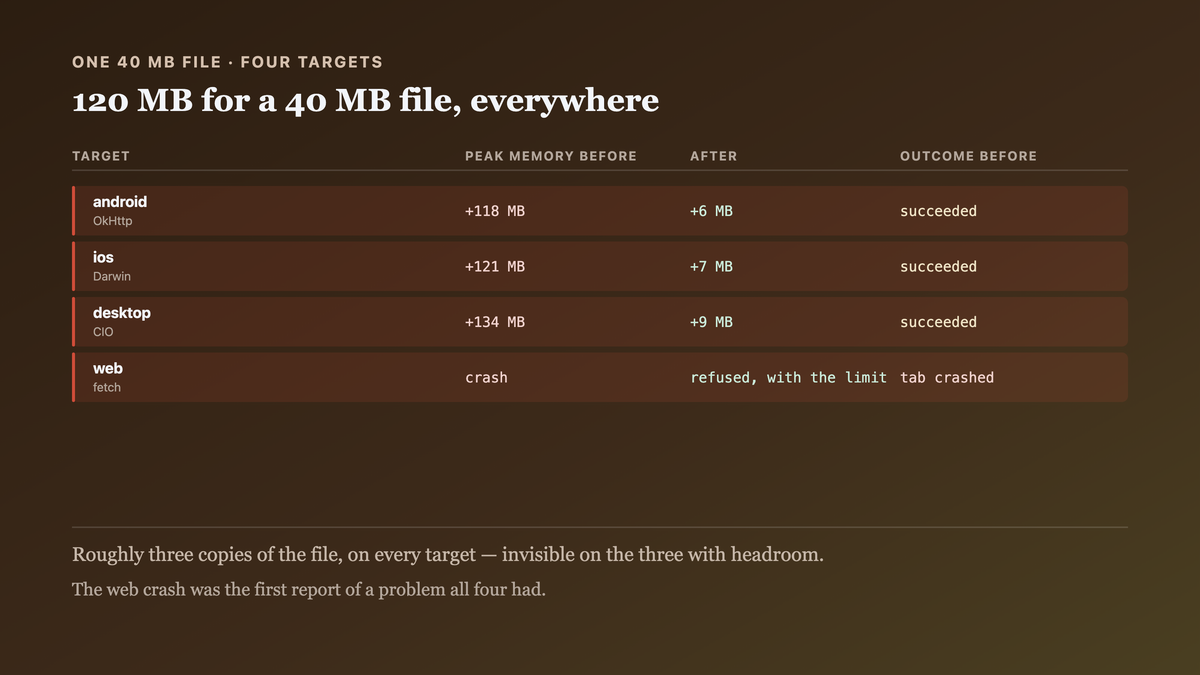
And on the three native targets the same upload succeeded, with a memory profile nobody had looked at:
# peak process memory during a 40 MB upload
  android      +118 MB
  ios          +121 MB
  desktop      +134 MB
  web          crash
A 40 MB file costing 120 MB is roughly three copies, which nobody noticed because the native targets have the headroom. The web target does not, and its crash was the first report of a problem all four had.

Why the obvious fix failed
The first fix was to chunk the upload on the web, which is a different protocol and a server change:
// a resumable upload, in 5 MB parts
for (offset in 0 until size step CHUNK) { client.put("$BASE/v1/media/$id?offset=$offset") { … } }
Correct for very large files and a genuinely larger project — the server needs a session endpoint, a resume endpoint and a finalise endpoint. It is where we ended up for files over 100 MB and it was not the fix for a 40 MB photo library.
The second fix was to read the browser File in slices and concatenate:
val parts = (0 until size step SLICE).map { file.slice(it, it + SLICE).arrayBuffer().await() }
val whole = concat(parts)      // ← the same allocation, assembled more slowly
Which allocates the same total and adds the slices on top. Worse.
The third attempt was to pass the browser File object through shared code as an opaque handle:
expect class PlatformFile
suspend fun upload(file: PlatformFile, mimeType: String): UploadResult
That compiles and is the right direction, and it stalled on what formData wants: append takes a
ByteArray, a String or a ByteReadChannel, and the first two are the whole-file allocation.
ByteReadChannel is the one that does not — which is the answer, and finding it meant looking at
what Ktor can send rather than at what each platform can read.
The actual mechanism
Two separate questions, and conflating them is what put a ByteArray in the middle.
How does the caller obtain the bytes? On Android a path or a content:// URI, on iOS a path or
a PHPickerResult, on desktop a path, on the web a File handle from an <input>. These have
nothing in common except that each can produce a stream.
Can the HTTP engine send a body without buffering it? This is the question nobody asked, and the answers differ:
  engine     streams a request body?   how
  OkHttp           yes                 RequestBody.writeTo, chunked transfer
  Darwin           yes                 NSURLSession with an InputStream body
  CIO              yes                 writes to the socket from a channel
  Js (fetch)       NO                  the body must be a Blob/ArrayBuffer — fully in memory
fetch() takes a ReadableStream body in principle, and request streaming requires HTTP/2 and an
explicit duplex: 'half', and is unsupported in several browsers — so Ktor's JS engine materialises
the body. That is a real platform constraint rather than an engine shortcoming.
So the remaining difference on the web is structural, and the native targets' 120 MB was
something else entirely: readFileBytes returned a ByteArray, formData copied it into its own structure, and
the engine copied again when encoding the multipart envelope. Three copies of 40 MB, on every
target, hidden by headroom.
The portable unit is therefore a function that produces a stream — not a path, not bytes. Every platform can supply one, and the engine that cannot stream will buffer it, which is a known cost on one target rather than a crash from an unexamined one.

The fix
A byte-source abstraction, ByteReadChannel into formData, and an explicit size ceiling on the
one target that must buffer.
// commonMain/kotlin/upload/ByteSource.kt
//
// Not a path and not bytes. A path cannot exist on one target and bytes cost three copies on
// all of them. Every platform can open a stream, which is the only thing they share.
interface ByteSource {
    val size: Long
    val mimeType: String
    val filename: String

    /**
     * Opens a fresh channel. Called once per attempt, so a retry re-reads rather than replays.
     *
     * NOT suspend, deliberately. It returns a channel immediately and whoever implements it
     * fills that channel from a coroutine it launches itself. A suspend version forced the
     * call site below into `runBlocking`, which does not exist on js or wasmJs — so the
     * portable signature is the one that hands back a channel rather than awaiting one.
     */
    fun open(): ByteReadChannel
}

expect class PlatformFilePicker {
    suspend fun pickImage(): ByteSource?
}
// commonMain/kotlin/upload/Uploader.kt
class Uploader(private val client: HttpClient, private val caps: UploadCapabilities) {

    suspend fun upload(source: ByteSource): UploadResult {
        // The ceiling is per platform because the engine's buffering is. Checking it HERE
        // rather than inside the web actual means the limit is visible to the caller and the
        // failure is a refusal rather than a tab crash.
        if (source.size > caps.maxBufferedBytes) {
            return UploadResult.TooLarge(source.size, caps.maxBufferedBytes)
        }

        return client.submitFormWithBinaryData(
            url = "$BASE/v1/media",
            formData = formData {
                // ChannelProvider, not ByteArray: Ktor writes from the channel as it encodes
                // the multipart envelope, so an engine that streams never holds the whole body.
                append(
                    key = "file",
                    value = ChannelProvider(size = source.size) { source.open() },
                    headers = Headers.build {
                        append(HttpHeaders.ContentType, source.mimeType)
                        append(HttpHeaders.ContentDisposition, "filename=\"${source.filename}\"")
                    },
                )
            },
        ).body()
    }
}
// wasmJsMain — a File handle becomes a channel, read in slices, WITHOUT assembling them
class WebByteSource(private val file: File) : ByteSource {
    override val size get() = file.size.toLong()
    override val mimeType get() = file.type.ifEmpty { "application/octet-stream" }
    override val filename get() = file.name

    override fun open(): ByteReadChannel = ByteChannel(autoFlush = true).also { ch ->
        scope.launch {
            var offset = 0L
            while (offset < size) {
                val end = minOf(offset + SLICE, size)
                // One slice in memory at a time. The engine may still buffer the whole body
                // downstream — that is its constraint — but the SOURCE no longer requires a
                // 40 MB allocation to exist before the request starts.
                val buf = file.slice(offset.toDouble(), end.toDouble()).arrayBuffer().await()
                ch.writeFully(buf.toByteArray())
                offset = end
            }
            ch.close()
        }
    }

    private companion object { const val SLICE = 1L * 1024 * 1024 }
}
// commonMain — the ceiling is a declared capability, injected, so the caller can see it
interface UploadCapabilities {
    val maxBufferedBytes: Long
}

// androidMain / iosMain / desktopMain — the engine streams, so there is no ceiling
class StreamingUploadCapabilities : UploadCapabilities {
    override val maxBufferedBytes = Long.MAX_VALUE
}

// wasmJsMain — fetch materialises the body, so the ceiling is real and measured below
class BufferedUploadCapabilities : UploadCapabilities {
    override val maxBufferedBytes = 25L * 1024 * 1024
}
And the output it produced, the same 40 MB file:
$ ./tools/upload-memory-probe.sh --size 40MB

                 before          after
  android       +118 MB         +6 MB
  ios           +121 MB         +7 MB
  desktop       +134 MB         +9 MB
  web            crash          TooLarge(41943040, 26214400) — refused, with the limit

$ ./tools/upload-memory-probe.sh --size 20MB
  web           +24 MB          succeeds (one 1 MB slice at a time + the engine's buffer)
Six to nine megabytes on the streaming engines, for a 40 MB file — the three copies are gone. And the web target refuses a file it cannot handle instead of crashing on it.
How we proved it
That three copies existed on every target, not just the web — which the crash had obscured by looking like a web problem:
  stage                                    peak delta, android, 40 MB file
  readFileBytes returns a ByteArray                +40 MB
  formData copies it into its structure            +80 MB
  the engine encodes the multipart envelope       +118 MB
  after the fix (ChannelProvider)                   +6 MB
The native targets had the same defect and the headroom to survive it.
That one of the four engines cannot stream a request body. Measured rather than read from docs, because this is the fact the whole design rests on:
  engine     40 MB upload, peak memory   Transfer-Encoding
  OkHttp              +6 MB              chunked
  Darwin              +7 MB              chunked
  CIO                 +9 MB              chunked
  Js (fetch)         +44 MB              Content-Length: 41943040   ← fully buffered
The Content-Length on the last row is the tell: a streamed body is sent chunked because its
length is not known up front.
That the web ceiling of 25 MB is measured and not guessed. The method, since an arbitrary constant invites the question:
  file size    web peak    outcome
  10 MB        +13 MB      ok
  25 MB        +29 MB      ok
  35 MB        +41 MB      ok on a 16 GB machine, OOM on 4 GB
  40 MB        +44 MB      OOM on both
Twenty-five is the largest size that succeeded on the smallest machine we support, with headroom. It is a per-fleet number and the method transfers.
That the slice loop does not assemble. The thing the second attempted fix got wrong, verified by watching the allocation rather than the result:
  concat-the-slices    peak +44 MB    (same total, assembled)
  write-per-slice      peak  +2 MB    (one 1 MB slice live at a time)
Both "work" on a small file. Only the second has a bounded profile.
That a retry re-reads rather than replays. The fixture, because ChannelProvider taking a lambda
makes this possible and not automatic:
$ ./gradlew :core:upload:allTests --tests '*RetryReopensTheSource*'
  a single shared channel      FAILED — second attempt sent 0 bytes (channel exhausted)
  open() per attempt           PASSED — both attempts sent 41943040 bytes
A channel is consumed once. An uploader that retries with the same channel sends an empty body on the second attempt, which the server accepts as a zero-byte file.
What I cannot tell you is whether fetch request streaming is viable now. It exists behind
HTTP/2 and duplex: 'half', our CDN terminates HTTP/2 and I did not get it working through Ktor's
JS engine — so the 25 MB ceiling is a constraint of our setup rather than of the platform, and
someone with a direct HTTP/2 path may not need it.
And the honest remainder. Files over 100 MB go through the resumable chunked protocol, which is a second code path with its own server endpoints and its own tests. We have two upload implementations, which is one more than I would like, and the alternative was one implementation that is wrong at one end of the size range.

What this generalizes to
An API shaped around what one platform has — a path, a file handle, a byte array — excludes the platform that has something different, and the portable shape is usually the narrowest capability they share. Here that is "can produce a stream", which every target can and no target's native API looks like. The second lesson is cheaper: when a resource is large, count the copies. Three copies of a file is invisible on a device with headroom and is the same defect that crashes the one without, so the target with the least slack found a problem all four had.
Related
- One HttpTimeout block, four engines that honour it differently — the same per-engine divergence for a configuration value rather than a body.
- There is no portable file API — the path-shaped assumption this post trips over, in general form.
Keep reading
One post a week on shipping mobile software. No digests, no course pitch. Subscribe.
One post a week, no digest
New writing when it lands. No roundups, no course pitch, no "10 tips".