
A dependency that resolves in commonMain and only exists on Android
Gradle metadata decides which variant each target gets. A library with no native artifact fails at link, not at resolution.
TL;DR
Adding a dependency to commonMain does not mean it is multiplatform. Gradle module metadata
describes which variants a library publishes, and resolution picks the matching one per target.
A library that publishes only a JVM/Android variant resolves fine for Android and has nothing to
offer iosArm64.
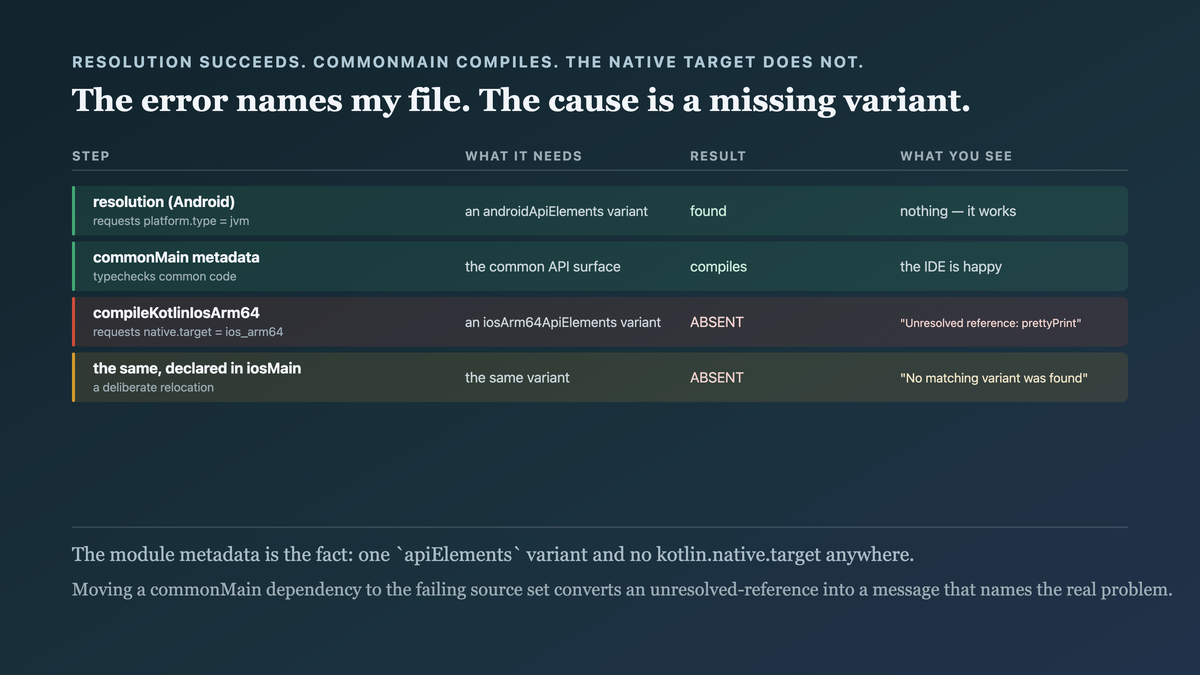
The failure arrives late and misnamed. Resolution succeeds, commonMain compiles against the
common metadata, and the error appears at the native compile or link step — often as "unresolved
reference" on your code or a missing symbol, rather than "this library has no native artifact".
Check the publication before adding, not after. gradle-module-metadata is readable and
authoritative.
The case this post is about
A shared module needing a small date-formatting helper, and a popular library that provides it:
// build.gradle.kts
sourceSets {
    commonMain.dependencies {
        implementation(libs.some.formatting.library)     // "it's Kotlin, so it's fine"
    }
}
// commonMain
import com.example.formatting.prettyPrint

fun label(d: LocalDate): String = d.prettyPrint()
Android built. Desktop built. ./gradlew assembleDebug green, and the pull request looked done.
The symptom
The native targets failed, and the error pointed at my code:
e: file:///…/commonMain/kotlin/Labels.kt:7:21 Unresolved reference: prettyPrint
e: file:///…/commonMain/kotlin/Labels.kt:3:36 Unresolved reference: formatting

> Task :shared:compileKotlinIosArm64 FAILED
Three things made this hard to read:
The error names my file and my symbol. Nothing says "the library has no iOS variant". It looks like a typo or a bad import, and the first instinct is to check the spelling.
commonMain had already compiled. The common metadata compilation succeeded, so the IDE was
happy and autocomplete worked — which is strong evidence that the dependency is fine.
And a different library produced a totally different error for the same root cause:
> Task :shared:linkDebugFrameworkIosArm64 FAILED
  e: Undefined symbols for architecture arm64: _kfun:com.example.other#helper(){}
Same problem — no native artifact — surfacing at link rather than compile, depending on how the library was structured.
Why the obvious fix failed
"Check the import spelling." Twenty minutes. The import was correct; it just did not exist for that target.
"Invalidate caches and re-sync." The universal Gradle ritual. Changed nothing, and consumed another ten minutes because a stale-metadata theory is plausible here.
"Move the dependency to androidMain and the call to androidMain." Works, and gives up the
sharing. Sometimes correct — if the capability is genuinely Android-only — and here it was a date
formatter, which is not.
"Add the dependency to each platform source set too." My first real attempt and it cannot work:
there is no artifact to add for iosArm64. Declaring it in iosMain produces a resolution failure
instead of a compile failure, which is at least a better error:
Could not resolve com.example:formatting:1.4.0
  No matching variant was found. Required kotlin-native-target 'ios_arm64' but:
    - Variant 'jvmApiElements' declares a usage of 'java-api'
That message is the one I needed from the start, and the only way I got it was by making the mistake in a different place.
The actual mechanism
Gradle module metadata is the key, and most people never read one.
A multiplatform library publishes a root module plus one variant per target. The root
.module file lists them — jvmApiElements, androidApiElements,
iosArm64ApiElements, wasmJsApiElements — each pointing at its own artifact.
Resolution happens per compilation, matched by attributes. Compiling iosArm64Main requests
variants with kotlin-native-target = ios_arm64. If the library publishes no such variant, there
is nothing to resolve.
commonMain compiles against metadata, not an artifact. There is a separate metadata
compilation whose job is to typecheck common code. For a library with a common API surface, that
can succeed even when a platform artifact is missing — which is exactly why commonMain compiles
and the per-target compilation does not.
So the sequence is: resolution succeeds for Android, metadata compilation succeeds for common, and the native compilation is the first step that genuinely needs an artifact that was never published.

A dependency is multiplatform only for the targets it publishes variants for. "It is written in Kotlin" says nothing; the module metadata is the fact.
Which means the question is answerable in about ten seconds, before you add the dependency —
and the answer lives in a file you can read directly. The .module descriptor is published
alongside the jar, so the check is: fetch it, list the variants, compare against the targets you
build:
#!/usr/bin/env bash
# kmp-targets <group:artifact:version> — what does this library ACTUALLY publish?
set -euo pipefail

IFS=':' read -r group artifact version <<< "$1"
path="${group//.//}/$artifact/$version/$artifact-$version.module"
required="${KMP_REQUIRED_TARGETS:-jvm android ios_arm64 ios_simulator_arm64 wasm_js}"

meta=$(curl -fsSL "https://repo1.maven.org/maven2/$path") || {
  echo "no Gradle module metadata — not a multiplatform publication at all"; exit 2; }

# One line per published variant: its name and the native/platform attribute that
# decides whether a given compilation can resolve it.
published=$(jq -r '
  .variants[]
  | [.name,
     (.attributes["org.jetbrains.kotlin.native.target"]
      // .attributes["org.jetbrains.kotlin.platform.type"])] | @tsv' <<< "$meta")

missing=()
for target in $required; do
  grep -qi "$target" <<< "$published" || missing+=("$target")
done

printf '%s\n' "$published"
if [ ${#missing[@]} -gt 0 ]; then
  echo "MISSING: ${missing[*]}" >&2
  exit 1                      # usable as a pre-merge check, not just a lookup
fi
echo "all required targets published"
On the named case — the library that compiled on Android and failed on iOS:
$ kmp-targets com.example:fancy-charts:2.1.0

jvmApiElements          jvm
jvmRuntimeElements      jvm
androidApiElements      androidJvm
androidRuntimeElements  androidJvm
MISSING: ios_arm64 ios_simulator_arm64 wasm_js
Four variants, two platforms, and not one of them native. That output is available the moment the
version exists on Maven Central — before the dependency is added, before commonMain compiles
cleanly and misleads you, and before the failure arrives pointing at your own file.
The exit 1 is the part worth keeping. As a lookup this is a curiosity; wired into CI over the
version catalog, it turns "does this library support our targets" from something you discover
during a build into something a pull request answers.
The fix
Check the publication first, and make the check mechanical so nobody has to remember.
Read the module metadata before adding a dependency. It is one request and it is definitive:
$ curl -s https://repo1.maven.org/maven2/io/ktor/ktor-client-core/2.3.12/ktor-client-core-2.3.12.module \
  | grep -o '"name": "[a-zA-Z0-9]*ApiElements"' | sort -u
"name": "androidApiElements"
"name": "iosArm64ApiElements"
"name": "iosSimulatorArm64ApiElements"
"name": "jsApiElements"
"name": "jvmApiElements"
"name": "wasmJsApiElements"
Every target present. Compare a JVM-only library:
$ curl -s …/some-formatting-library-1.4.0.module | grep -o '"name": "[a-zA-Z0-9]*ApiElements"'
"name": "apiElements"
One variant, no kotlin-native-target anywhere. That is the answer in five seconds, and it is the
check I should have run before writing any code.
Then a CI gate, so the whole matrix is compiled. This class of bug only exists when some targets are not built:
./gradlew :shared:compileKotlinIosArm64 \
          :shared:compileKotlinIosSimulatorArm64 \
          :shared:compileKotlinWasmJs \
          :shared:compileDebugKotlinAndroid \
          :shared:compileKotlinDesktop
The compile-everything/link-on-merge split makes this affordable, and it turns a late surprise into a pull-request failure.
And when a library genuinely is Android-only, wrap it behind a seam rather than relocating the call site:
// commonMain — the capability, not the library
interface DateLabeler { fun label(date: LocalDate): String }

// androidMain — uses the Android-only library
actual fun dateLabeler(): DateLabeler = AndroidDateLabeler()

// iosMain / wasmJsMain / desktopMain — kotlinx-datetime, which IS multiplatform
actual fun dateLabeler(): DateLabeler = CommonDateLabeler()
Though in this specific case the right answer was simpler: kotlinx-datetime does the job on every
target, and the Android-only library was never needed. Checking the metadata first would have led
there directly instead of through an afternoon.
A note on the confusing middle case. Some libraries publish an Android variant and a JVM
variant with different artifacts, and a few publish an Android variant that an androidTarget()
consumer resolves while a jvm() consumer does not — producing the mirror-image version of this
bug where desktop fails and mobile is fine. The metadata is still the answer; the lesson is to read
it rather than to infer from which of your targets happened to work.
How we proved it
That the library had no native variant. The metadata grep above is the proof, and it is worth noting it is a primary source — not an inference from a build error:
some-formatting-library-1.4.0.module  → 1 variant  (apiElements, java-api)
ktor-client-core-2.3.12.module        → 6 variants (incl. iosArm64, wasmJs)
That the full-matrix compile catches it. Verified by reintroducing the bad dependency on a branch:
$ ./gradlew :shared:compileDebugKotlinAndroid
BUILD SUCCESSFUL                         ← the old CI configuration

$ ./gradlew :shared:compileKotlinIosArm64
e: Unresolved reference: prettyPrint
BUILD FAILED                             ← the new one
The two commands on the same commit is the clearest demonstration that this was a coverage gap, not a library mystery.
And that declaring it in iosMain gives the honest error — worth recording, because it is a
genuinely useful diagnostic technique:
> Could not resolve com.example:formatting:1.4.0
  No matching variant was found. Required kotlin-native-target 'ios_arm64' but:
    - Variant 'jvmApiElements' declares a usage of 'java-api'
When a commonMain dependency produces a confusing per-target failure, temporarily moving it to
the failing target's source set converts an unresolved-reference into a variant-mismatch message
that names the real problem. That is the trick I would want to know next time.
One limit: the grep for ApiElements is a quick read of one convention. A library with an unusual
publication layout, or a relocated/shaded artifact, needs the full .module read rather than a
pattern match — and ./gradlew :shared:dependencies per configuration is the authoritative local
check.
What this generalizes to
Resolution success is not availability. A dependency resolving says a matching variant was found for that configuration. Every ecosystem with platform-specific artifacts has this shape — native extensions in Python wheels, platform binaries in npm optional dependencies, architecture tags in container images.
The error surfaces where the artifact is needed, not where the mistake was made. The mistake was in a dependency declaration; the error named a line in an unrelated file. When a diagnostic points at your own code and the code is obviously right, ask what was supposed to be provided to it.
Read the primary source. The module metadata answered in five seconds what an afternoon of build-error archaeology did not. Package registries publish this information precisely so you do not have to infer it.
Deliberately relocating a failure can improve its message. Moving the dependency to the failing source set turned a vague unresolved-reference into an explicit variant mismatch. Making a bug happen somewhere more honest is a legitimate debugging move.
Related
- A version catalog is a contract, and a transitive bump breaks it quietly — the other way resolution surprises you
- One Gradle build, five outputs, and the cache that only helps three — making the full-matrix compile affordable
- Source sets are a graph, and iosMain is not where you think it is — where a per-target dependency belongs
Keep reading
This is part of 100 Days of Kotlin Multiplatform — the boundaries, the sharp edges, and the things that only show up on the second target. Follow MobileByteSensei for the rest.
One post a week, no digest
New writing when it lands. No roundups, no course pitch, no "10 tips".