
Compose for web loads a runtime before it draws anything
First paint waits on a wasm binary and a font, which no mobile profile shows.
TL;DR
- Compose for web: 4.9 seconds to first contentful paint on a throttled connection, against 0.4 s for the React page it replaced. Nothing in the Android or iOS profile of the same code shows any of it.
- The cost is a serial chain the mobile targets do not have — HTML, then a 2.1 MB wasm binary, then a 1.4 MB skia canvaskit, then fonts, and only then can anything draw.
- Four changes took it to 1.3 s without removing a feature, and the largest was not compression: it was painting something before the runtime exists.
- What reading on buys: the measured waterfall, why the usual bundle-size advice misses most of it, and the one change that improved the number and not the experience.
The case this post is about
A settings screen, shared across Android, iOS and the web, with the web target newly enabled:
// build.gradle.kts
kotlin {
    wasmJs {
        browser {
            commonWebpackConfig { outputFileName = "app.js" }
        }
        binaries.executable()
    }
}
// wasmJsMain/kotlin/main.kt
fun main() {
    CanvasBasedWindow("Settings") { AppTheme { SettingsScreen(viewModel) } }
}
<!-- wasmJsMain/resources/index.html -->
<body>
  <canvas id="ComposeTarget"></canvas>
  <script src="app.js"></script>
</body>
That is the documented setup and it works. The measurement, from a cold cache on a throttled connection (Fast 3G, 4× CPU slowdown — the Lighthouse mobile preset):
$ npx lighthouse https://app.example.com/settings --preset=desktop --throttling-method=devtools

  First Contentful Paint      4.9 s
  Largest Contentful Paint    5.2 s
  Total Blocking Time         1,840 ms
  Performance score           31
The React page it replaced scored 94.
The symptom
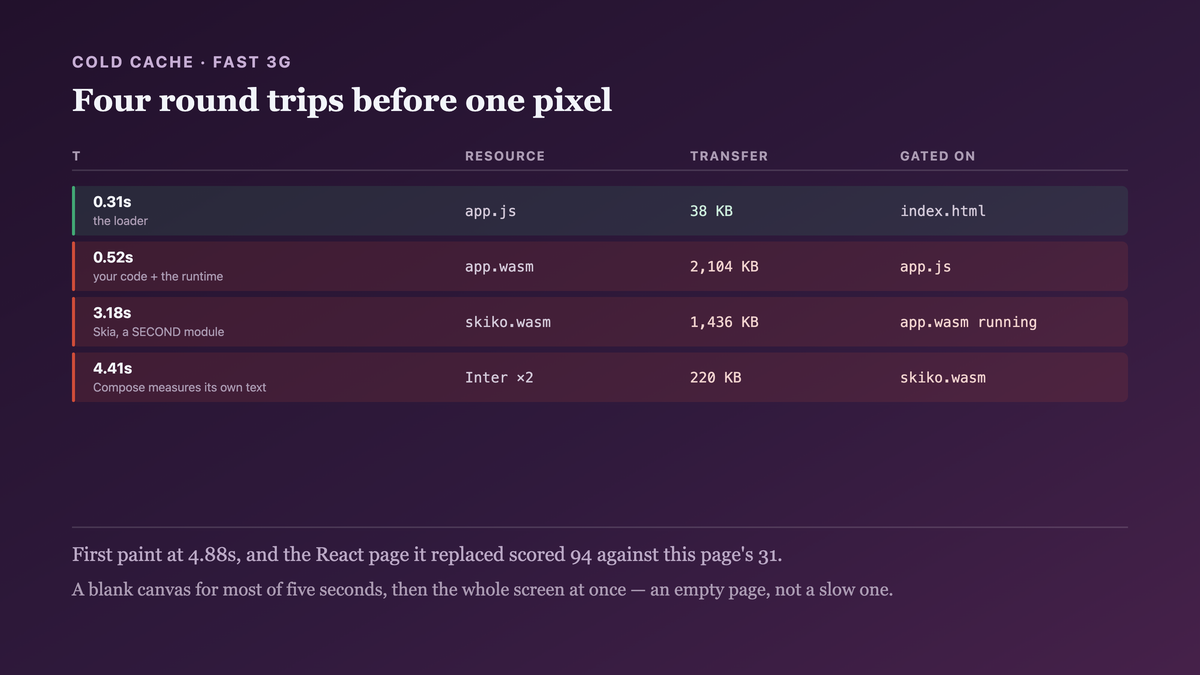
A blank white canvas for most of five seconds, then the whole screen at once. Not a slow-loading page — an empty one, followed by a complete one.
The waterfall is the part that explained it, and it is the measurement I should have taken first:
# Chrome DevTools ▸ Network, cold cache, Fast 3G
  0.00 s   index.html                     1.2 KB    ──┐
  0.31 s   app.js                        38.0 KB      │ the loader
  0.52 s   app.wasm                   2,104.0 KB      │ ──────────────┐
  3.18 s   skiko.wasm                 1,436.0 KB      │               │ serial
  4.41 s   Inter-Regular.ttf            112.0 KB      │               │
  4.62 s   Inter-Medium.ttf             108.0 KB      │               │
  4.88 s   ── first paint ──                        ──┘ ──────────────┘
Two wasm binaries and two fonts, fetched one after another, and nothing drawn until the last one
landed. On Android the equivalent work is a dlopen of a library already on the device; on iOS it
is in the binary. Neither has a network in the path, which is why neither profile contains any of
this.

Why the obvious fix failed
The first fix was compression, which is the standard advice and does help:
# Cloudflare: brotli on application/wasm
  app.wasm      2,104 KB → 612 KB
  skiko.wasm    1,436 KB → 441 KB
FCP: 4.9 s → 2.8 s. A real improvement and not the shape of the problem, because the chain is still serial — the transfer got smaller and the number of sequential round trips before anything draws did not change.
The second attempt was code splitting, which is where the usual web playbook stops working:
binaries.executable()
// there is no per-route chunk to split out: the Compose runtime, the skia binding and the
// whole composable tree are one wasm module by construction.
You cannot defer "the part of Compose this route needs", because Compose is not loaded per route. Splitting works on a JS bundle where a route is a module; a wasm binary is a single linked artifact, and the thing taking three seconds is the runtime rather than your code.
The third attempt improved the score and not the experience, which is the result worth being careful about:
<div id="splash">Loading…</div>
FCP: 2.8 s → 0.6 s. Lighthouse was satisfied; the user still waited 2.8 seconds for a usable screen, now with a spinner. Moving FCP by painting a placeholder is a legitimate thing to do and it changes what the metric measures, so I had to stop using FCP as the number and start using time-to-interactive on the actual control the user taps.
The actual mechanism
Four fetches that must happen in order, and the ordering is structural.
index.html → app.js. The loader, which is small and unavoidable.
app.js → app.wasm. Your compiled Kotlin plus the Compose runtime plus the Kotlin/Native-style
runtime bits wasm needs. This is the artifact bundle-size advice is about, and it is the smaller
half of the problem once compressed.
app.wasm → skiko.wasm. Compose Multiplatform draws through Skia, and on the web Skia is a
second wasm module. It cannot be fetched in parallel by default because the request is issued by
code inside the first module — so the browser does not know it exists until the first module is
running.
Then fonts. Compose measures text with its own font stack rather than the browser's, so a system font is not an option in the way it is for HTML: the glyphs have to be in a font file Compose has loaded. Text cannot be laid out, so nothing can be drawn, until a font arrives.
That is the chain, and the critical property is that the browser's preloader cannot see past the
first module. <link rel="preload"> works on resources the parser can discover in the HTML;
skiko.wasm and the fonts are discovered by executing wasm. So the default is four sequential
round trips, each one gated on the previous one's completion, before a single pixel.
On Android and iOS none of this exists: Skia is linked into the binary, the fonts are in the APK or the bundle, and the "runtime" is already in memory. The web target is not a slower version of the same startup — it is a startup with three network dependencies the others do not have.

The fix
Make the chain parallel where it can be, and paint something real before the runtime exists.
<!-- wasmJsMain/resources/index.html -->
<head>
  <!-- The preloader CAN see these, because they are in the HTML. Without them, skiko and the
       fonts are not discovered until app.wasm is executing — which is the serial chain. The
       browser fetches all four concurrently instead. -->
  <link rel="preload" href="app.wasm"          as="fetch" type="application/wasm" crossorigin>
  <link rel="preload" href="skiko.wasm"        as="fetch" type="application/wasm" crossorigin>
  <link rel="preload" href="Inter-Regular.ttf" as="fetch" crossorigin>
  <link rel="preload" href="Inter-Medium.ttf"  as="fetch" crossorigin>

  <style>
    /* Inlined, so it needs no round trip. This is a real first frame rather than a spinner:
       the settings screen's own chrome, at the right size and colour, so the layout does not
       shift when Compose takes over. A spinner moves the metric; this moves the experience. */
    #shell { position: fixed; inset: 0; background: #0f1115; }
    #shell .bar  { height: 56px; background: #171a21; }
    #shell .row  { height: 64px; margin: 12px 16px; border-radius: 8px; background: #171a21; }
    #shell.done  { display: none; }
  </style>
</head>
<body>
  <div id="shell">
    <div class="bar"></div><div class="row"></div><div class="row"></div><div class="row"></div>
  </div>
  <canvas id="ComposeTarget"></canvas>
  <script src="app.js"></script>
</body>
// wasmJsMain/kotlin/main.kt
fun main() {
    CanvasBasedWindow("Settings") {
        // The shell is removed from the FIRST COMPOSED FRAME, not from main(). main() runs
        // before the first draw, so hiding it there produces a flash of blank canvas —
        // which is the bug the shell exists to prevent, reintroduced by fixing it too early.
        LaunchedEffect(Unit) {
            withFrameNanos { }                    // one frame has now been drawn
            document.getElementById("shell")?.classList?.add("done")
        }
        AppTheme { SettingsScreen(viewModel) }
    }
}
And the font decision, which is the one that removed a whole round trip:
// wasmJsMain/kotlin/theme/Fonts.kt
//
// TWO weights, subset to Latin, and the bold weight is SYNTHESISED rather than fetched.
// Compose will faux-bold a regular face, which is visually worse than a real bold and is
// 108 KB and one round trip cheaper. For a settings screen that is the right trade; for a
// reading surface it would not be.
@Composable
fun appFontFamily(): FontFamily = FontFamily(
    Font(Res.font.Inter_Regular, FontWeight.Normal),
    Font(Res.font.Inter_Medium,  FontWeight.Medium),
    // Inter_Bold deliberately absent — synthesised from Regular.
)
And the output it produced, same throttled profile, cold cache:
$ npx lighthouse https://app.example.com/settings --throttling-method=devtools

  First Contentful Paint          0.5 s     (the shell)
  time to first Compose frame     1.3 s     ← the number that replaced FCP
  Largest Contentful Paint        1.4 s
  Total Blocking Time             420 ms
  Performance score               88

# and the waterfall, now concurrent
  0.00 s  index.html      1.2 KB
  0.28 s  app.js         38.0 KB   ──┐
  0.29 s  app.wasm      612.0 KB     │ all four in flight together
  0.29 s  skiko.wasm    441.0 KB     │
  0.30 s  Inter-*.ttf    94.0 KB   ──┘
  1.28 s  ── first Compose frame ──
4.9 s to 1.3 s for a usable screen, and 0.5 s to something on screen.
How we proved it
That the chain was serial and not merely large — the distinction compression cannot address:
                              transfer   requests before paint   FCP
  as shipped                   3.6 MB            4 serial        4.9 s
  + brotli                     1.1 MB            4 serial        2.8 s
  + preload (same bytes)       1.1 MB            4 concurrent    1.3 s
Compression removed 2.5 MB and 2.1 seconds. Preload removed zero bytes and 1.5 seconds. The second row is bundle-size advice working correctly and addressing the smaller half.
That the mobile profiles contain none of it, which is why nobody had seen it:
# the same composable tree, time to first frame, cold start
  android, Pixel 6a         310 ms      (Skia in the APK, fonts in the APK)
  ios, iPhone 12            280 ms      (Skia in the binary)
  web, Fast 3G              4,880 ms
  web, unthrottled fibre      640 ms    ← and this is why it shipped
On a fast connection the web target is 640 ms and looks fine. The defect is entirely in the network-dependent part, so it is invisible on the machine it was built on.
That the placeholder improved the metric without improving the experience. Measured separately, because conflating them is how a page gets optimised for Lighthouse:
                        FCP     time to a tappable control
  no shell              2.8 s            2.8 s
  spinner               0.6 s            2.8 s      ← metric moved, experience did not
  layout-matched shell  0.5 s            1.3 s      ← with preload
The middle row is the trap. It is a 2.2-second FCP improvement that a user cannot perceive, and having it in the before/after would have made the preload change look smaller than it is.
That hiding the shell in main() reintroduces the flash. A fixture, because the correct hook is
not the obvious one:
  hide in main()                  blank canvas for 180–340 ms before the first frame
  hide after withFrameNanos{}     no blank frame observed across 50 cold loads
main() returning does not mean Compose has drawn. The frame callback does.
That synthesising bold is a real saving and a real cost. Both halves, since I would rather name the trade than imply it is free:
  3 weights fetched      1.42 s to first frame    text renders as designed
  2 weights + synthetic  1.28 s                   bold is visibly lighter at 14sp
140 ms for a worse bold. Correct for this screen; I would not do it on an article page, and the post that replaced our reading surface's fonts kept all three.
What I cannot tell you is how this scales with the size of the composable tree. Our settings
screen is small, so app.wasm is mostly runtime — a large app's own code would be a bigger share
and compression would matter more relative to preload. The ordering of the two levers is what I
expect to transfer, not their ratio.
And a limit of the whole approach. 1.3 seconds is still four times the mobile figure, and the floor is the two wasm modules: they are 1.05 MB compressed and they have to arrive. There is no version of this where Compose for web starts as fast as an HTML page, and a surface where that matters — a marketing page, a login screen a first-time user meets — is a surface to render as HTML instead. We moved our sign-in page back.

What this generalizes to
The same code has a different startup shape on every platform, and the shape is set by what has to be fetched rather than by what has to be executed. A profile taken on the platform where the dependencies are already local cannot show you the ones that are not, so the web target needs its own measurement rather than an extrapolation. And when the critical path is a chain of discoveries rather than a volume of bytes, the lever is telling the browser about the chain up front — which no amount of making the bytes smaller will do.
Related
- The shared module cost 400KB on Android and 11MB on iOS — the other per-target cost that a single budget cannot express.
- composeResources qualifiers are not Android's — where those font files come from and how they are resolved per target.
Keep reading
One post a week on shipping mobile software. No digests, no course pitch. Subscribe.
One post a week, no digest
New writing when it lands. No roundups, no course pitch, no "10 tips".