
The placeholder listing that almost went live
A template store listing reaches production unless promoting the real one is a human gate that refuses. Why the failure is silent and what has to block on it.
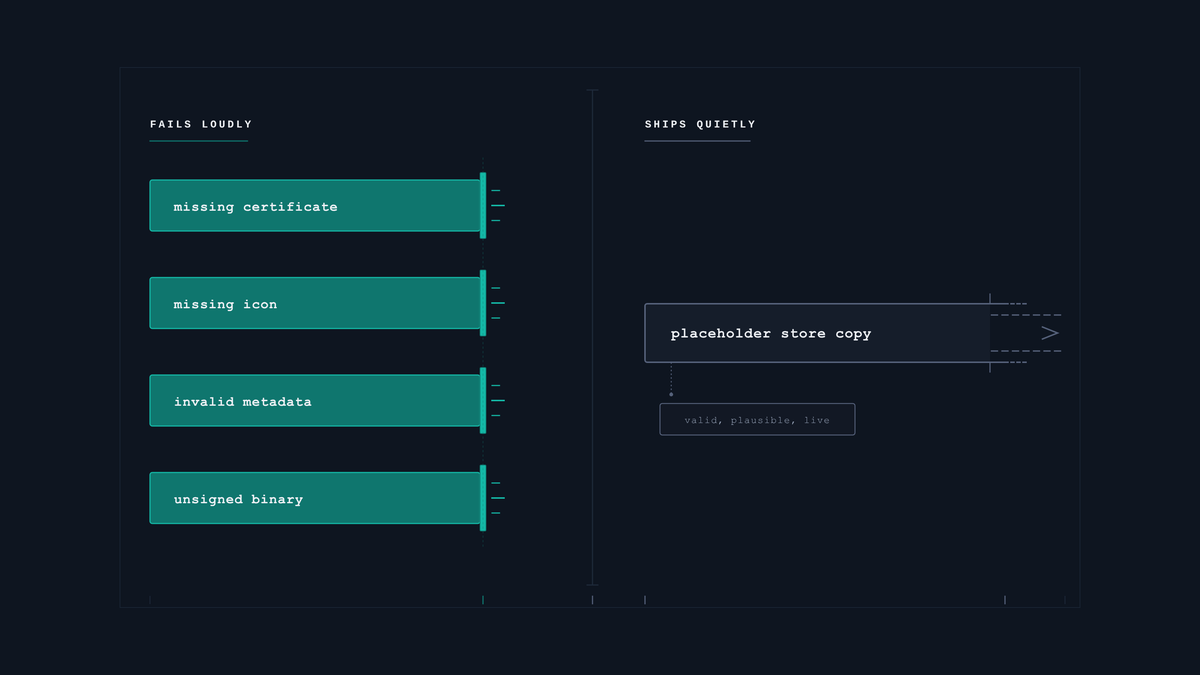
Every project scaffolded from a template inherits that template's store listing. A name, a short description, a long description, a category. All of it placeholder, all of it syntactically valid.
Nothing in a build or a deploy treats that as an error, because it is not one. It is content, and content is whatever you put there.
The case this post is about
One deploy, halted one step before it published the template's own store copy:
$ deploy --track internal
HALT store-listing-not-promoted
  no listing variant promoted to the app profile.
The app profile ships with the template's marketing text — a placeholder name, a placeholder package, filler prose. Branded listings live elsewhere, as variants, and reach the profile only when somebody explicitly promotes one.
Miss that step and nothing fails. The build succeeds, the upload succeeds, and the store publishes exactly what it was given, which is a listing for a product that does not exist.
This post follows that halt, because it is the one gate in the release that cannot be automatic: which variant ships is a decision, and the agent's job is to refuse until somebody makes it.
The symptom
The failure has no symptom. That is the whole problem.
A missing signing certificate fails the build. A missing icon fails the upload. A placeholder description uploads cleanly, passes review in most cases, and appears on a public listing under your app's name. The first thing that notices is a human looking at the store page, and by then it is live.
What makes it likely rather than merely possible is that the placeholder reads as plausible. It is not a row of X's or an unresolved marker. It is a coherent app description for a different app — the template's demo — with sensible capitalisation and no obvious tell. Skimming it during a release checklist, you see text where text should be, and move on.

And it is a first-release problem specifically, which means it lands on the one release where everything else is also new and attention is most divided.
Why the obvious fix failed
The obvious fix is a checklist item: replace the store listing before first release.
Checklists fail on first releases for a structural reason — a first release is the one time nobody has done this before, the checklist is longest, and several items are genuinely ambiguous. The listing item sits among twenty others and does not announce itself as the one with permanent public consequences.
The second attempt is to scan for obvious placeholder strings — example domains, filler latin, unresolved markers. That catches the lazy cases and it does not catch a well-written description of the wrong product. The template's copy is good copy; that is why it was in the template. A content scanner cannot tell good copy for something else from good copy for this.
That limitation is sharper than it sounds, and I hit it writing this. The draft originally named two of those filler strings as examples, and the blog's own publishing preflight refused the post — correctly, because a scanner cannot distinguish quoting a marker from leaving one. The check is blunt on purpose. Teaching it to recognise intent would be teaching it to be argued with, and a placeholder check that can be argued with is the one that lets the template listing through.
The third is to automate the promotion: whenever a branded listing exists, promote it automatically. That one is tempting and it is wrong for a different reason, which is the subject of the next section.
The actual mechanism
Separate the two artifacts, and make the step between them a human gate.
The branded listing lives apart from the app profile. Writing store copy is authoring work with variants — you try two openings, you shorten the subtitle, you keep both. That belongs in its own tree, versioned, with more than one candidate allowed to exist.
Promotion is the act of choosing. Moving a variant into the app profile is the decision about which text the public sees. It is not a derivation, because nothing in the data says which variant is best — that is a judgement about positioning.
The deploy refuses on an unpromoted profile. Before any build, sign or upload, check whether a variant has been promoted. Not promoted means stop, show the variants, ask which one.
And refuse a stale promotion. A marker saying "promoted" that predates the current variants is worse than no marker, because it reports a decision that was made about different text.
The fix
The part that is easy to get wrong: the gate must not pick for you.
An automated promote would remove the failure mode in this article and introduce a quieter one — the wrong variant shipping, with no record that a choice was ever made. When two candidate descriptions exist, the system has no basis for preferring one. A gate that picks anyway has converted an obvious problem into a subtle one.
So the gate blocks and asks, rather than choosing — it refuses to proceed and prints the candidates:
// FILLER_PROSE matches the standard dummy-text opening; kept in one place so the
// marker list reads as a list rather than as a wall of literals.
const TEMPLATE_MARKERS = [/com\.example/, /App Toolkit/, FILLER_PROSE, /YOUR_APP_NAME/];

export async function assertListingPromoted(profile: StoreProfile, variantsDir: string) {
  const promoted = profile.promoted?.variant;

  if (!promoted) {
    const variants = [...await listDirs(variantsDir)];
    throw new Halt("store-listing-not-promoted",
      `no listing variant promoted to the app profile.\n` +
      `  candidates: ${variants.join(", ")}\n` +
      `  promote one deliberately — this tool will not choose for you,\n` +
      `  because two plausible descriptions have no mechanical tiebreak.`);
  }

  // Backstop: promoted, but the profile still carries template sentinels — i.e.
  // the promote happened and did not take.
  const hit = TEMPLATE_MARKERS.find((re) => re.test(JSON.stringify(profile.store)));
  if (hit) {
    throw new Halt("store-listing-stale", `promoted '${promoted}' but the profile still matches ${hit}`);
  }
}
On a first release:
$ deploy --track internal
HALT store-listing-not-promoted
  no listing variant promoted to the app profile.
    candidates: v1-concise, v2-benefit-led, v3-long
    promote one deliberately — this tool will not choose for you,
    because two plausible descriptions have no mechanical tiebreak.
The halt runs before the build, before signing, before upload — so the cost of being stopped is seconds. The failure it replaces was a template description reaching a live store listing.
The backstop deserves more attention than it usually gets, because it covers the case the first check cannot see. A promote that was performed but did not take — because the variant was written to the wrong key, or the profile was regenerated afterwards from the template — leaves a profile that reports itself promoted and still carries the placeholder text. Checking the marker is what distinguishes "somebody promoted a variant" from "the promoted variant is actually in there".
That second check has to be scoped carefully or it becomes noise. Plenty of legitimate configuration carries placeholder-looking values — a backend URL that is genuinely templated per environment, an identifier filled in at build time. Matching those produces failures on correct configurations, and a gate that fails on correct input gets disabled. So the markers are drawn narrowly around the store listing block rather than applied to the whole profile.
The reason this is a human gate rather than an automated one comes down to there being no mechanical tiebreak. Two candidate descriptions are both well-formed, both the right length, both on-brand. Nothing in the artifacts prefers one, and a system that picks anyway is making a marketing decision on the basis of alphabetical order. The halt is cheap and the wrong description is not.
What makes the halt tolerable is where it sits. Running before the build means the cost of being stopped is the time it takes to read the message and type one command — no compile, no signing round, no upload. A gate with the same logic placed at upload time would be correct and would arrive after twenty minutes of work, which is the point at which people start looking for the override.
So the gate refuses and renders the list. Which variant ships is the operator's call, and the only thing that clears the gate is somebody naming one. Already promoted means silent pass, every time, with no friction on the hundredth release.
Position matters too. This runs before the build, not before the upload. A gate at upload time has let you spend fifteen minutes compiling and signing something you are about to be told you cannot ship, and a gate that wastes time is one people start working around.
The variants directory earns its place here rather than being extra structure. Store copy genuinely has alternatives — a shorter subtitle, a different opening line, a version that leads with the feature instead of the problem — and keeping them in one file means each edit destroys the previous candidate. Keeping them separate means the promote step has something real to choose between, which is what makes it a decision rather than a formality. A gate that always has exactly one option is a gate people learn to clear without reading.
And the marker records which variant, not merely that promotion happened. Those differ the moment a second variant is edited after promotion: a boolean still says yes, while the text the public sees and the text you last worked on have quietly diverged.
How we proved it
The motivating case is a near miss rather than an incident, which is the best time to write a gate.
An app profile scaffolded from the template still carried the template's store block — the demo name, the demo descriptions — while the real branded copy sat in a variants directory, written and never promoted. Every other release gate passed. The build was signable, the assets were present, the metadata was valid. The deploy would have pushed the template's text to a live listing.
build          ✅ signable
assets         ✅ present
metadata       ✅ valid
store listing  ❌ never promoted — template copy intact
What is worth noticing is that four green checks preceded the one that mattered, and none of them was wrong. Each verified a real property. The gap was a property nobody had thought to verify, and the reason to write it down is that this class — valid-but-unintended content — is invisible to every check that asks whether something is well-formed.
Also measured: a sentinel scan backstops it. If the app profile still contains the template's distinctive strings, that is caught independently of whether a promotion marker exists. Two checks that can fail separately beat one that has to be right.
What I have not tested: how this behaves on a store that rejects a listing for policy reasons after promotion. The gate proves a choice was made, not that the choice is acceptable to a reviewer, and those are different failures with different recovery paths.
What this generalizes to
Any artifact your scaffold provides as a placeholder will ship unless something refuses to proceed without a replacement. Validity checks will not catch it, because placeholders are valid — that is what makes them usable as placeholders.
So find the places where your template hands you working content: store copy, a privacy policy URL, a support email, an app name, a bundle id. For each, ask what fails if it reaches production unchanged. Where the answer is "nothing fails, it just goes live", you need a gate that blocks on an explicit human choice — and it should ask rather than guess, because a system that picks for you has not removed the risk, only hidden it.
One post a week, no digest
New writing when it lands. No roundups, no course pitch, no "10 tips".