
The same dp is a different number of pixels on every target
Density comes from the platform and the user's font scale multiplies it.
TL;DR
- A 320 dp dialog that fit on every device we tested and clipped its confirm button on a Pixel 7a at the largest accessibility font scale — and on the web at browser zoom 150%, which is a setting Compose does not see as zoom at all.
- Density comes from the platform, font scale is a second independent multiplier, and the two
compose: a
48.dprow holding16.sptext is not a fixed height once the user has scaled text. - Four fixes, and the one that mattered was not a bigger number — it was asserting against the measured height rather than a designed one.
- What reading on buys: where each target gets its density, which multiplier the web omits, and the test matrix that found the clip before a user did.
The case this post is about
A confirmation dialog, sized the way the design file specified:
// commonMain/kotlin/ui/ConfirmDialog.kt
@Composable
fun ConfirmDialog(onConfirm: () -> Unit, onDismiss: () -> Unit) {
    Surface(Modifier.width(320.dp).height(180.dp)) {
        Column(Modifier.padding(24.dp)) {
            Text("Delete this item?", style = MaterialTheme.typography.titleMedium)   // 16.sp
            Spacer(Modifier.height(8.dp))
            Text("This cannot be undone.", style = MaterialTheme.typography.bodyMedium) // 14.sp
            Spacer(Modifier.weight(1f))
            Row(Modifier.align(Alignment.End)) {
                TextButton(onDismiss) { Text("Cancel") }
                Button(onConfirm) { Text("Delete") }
            }
        }
    }
}
320 × 180 dp, 24 dp padding, two text styles. It renders correctly on a Pixel 6a, an iPhone 12, a desktop window and a browser at 100%.
The symptom
A screenshot from a user, on a Pixel 7a:
# the dialog, with Settings ▸ Display ▸ Font size at its largest
  "Delete this item?"      wrapped to two lines
  "This cannot be undone."  wrapped to two lines
  [ Cancel ]  [ Dele…       ← the confirm button, clipped at the Surface's bottom edge
The button was outside the 180 dp box, so it was not merely ugly — it was unreachable. A destructive dialog whose confirm button cannot be tapped is arguably the safe failure, and the dismiss button was clipped on the next size up.
And the web, at browser zoom 150%, which nobody had tested:
layout identical to 100%, every element 1.5× larger, clipped the same way
Two platforms, one cause, and neither reproduced on the devices in the office.

Why the obvious fix failed
The first fix was a bigger box:
Surface(Modifier.width(320.dp).height(240.dp))
Which fixes the reported device and not the next one. Font scale on Android goes to 2.0 in Settings and to 1.3 again on top of that via per-app overrides on newer versions, so there is no height that is large enough — the content's height is a function of a user setting with no documented ceiling, and picking a number is picking which users to clip.
The second fix was to cap the font scale, which is a real API and is the wrong instinct:
CompositionLocalProvider(
    LocalDensity provides Density(density = LocalDensity.current.density, fontScale = 1.0f)
) { ConfirmDialog(…) }
That makes the dialog fit by ignoring the accessibility setting, which is the setting's whole purpose. It also only looks fine: a user who has set 200% text sees 100% text in this one dialog, which reads as a rendering bug and is worse than a clipped button because it is silent.
The third fix was verticalScroll, which is defensible and was not enough on its own:
Column(Modifier.verticalScroll(rememberScrollState()).padding(24.dp))
The text scrolled; the buttons scrolled with it, so the confirm button was now reachable after a scroll the user has no reason to attempt in a 180 dp box that looks complete. Reachable and undiscoverable.
The actual mechanism
Two independent multipliers, from two different sources, and only one of them is what people mean by "density".
Density converts dp to pixels and comes from the platform. On Android it is the screen's
bucket (2.625 on a Pixel 7a). On iOS it is the UIScreen scale (2.0 or 3.0). On desktop it
is the window's scale factor. On the web Compose derives it from window.devicePixelRatio.
Font scale is a second multiplier applied to sp only, and it is a user accessibility
setting rather than a device property:
  Android    Settings ▸ Display ▸ Font size        1.0 … 2.0  (and per-app on newer versions)
  iOS        Settings ▸ Display ▸ Text Size        ~0.82 … 1.35, more with Larger Accessibility Sizes
  desktop    no OS-level equivalent Compose reads   always 1.0
  web        no equivalent Compose reads            always 1.0
So 16.sp is 16 × density × fontScale pixels and 16.dp is 16 × density. A row that is
48.dp tall holding 16.sp text has a fixed height and variable content, and the content
wins or is clipped.
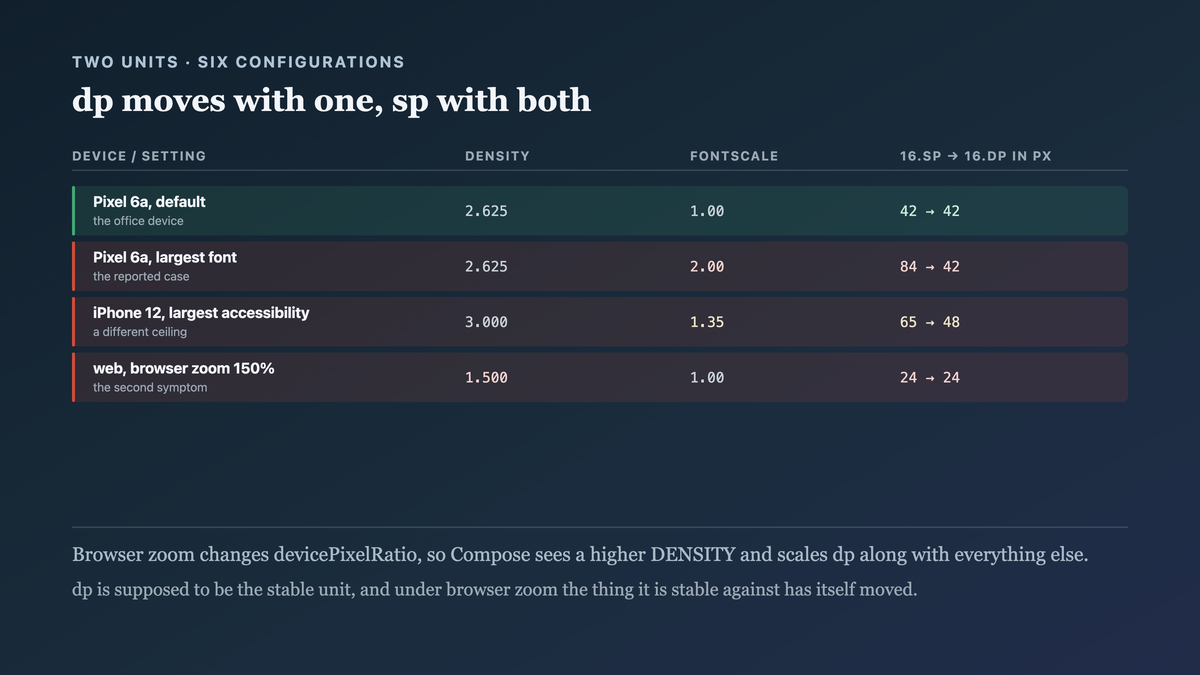
And the web's browser zoom does not appear as either. Browser zoom changes
devicePixelRatio, so Compose sees a higher density and scales everything — including dp — which
is why the web symptom looks identical to the Android one and arrives through a different
mechanism. dp is supposed to be the stable unit and under browser zoom it is not, because the
thing it is stable against has itself moved.
That is the whole defect: a height in dp and content in sp are measured in units that scale
independently, and the one that scales further is the one the user controls.

The fix
Stop specifying the height. Let the content measure, constrain only what must be constrained, and assert against the measured result.
// commonMain/kotlin/ui/ConfirmDialog.kt
@Composable
fun ConfirmDialog(onConfirm: () -> Unit, onDismiss: () -> Unit) {
    // containerSize is in PIXELS, so it has to be CONVERTED rather than relabelled. An
    // earlier version wrote `containerSize.height.dp`, which calls 2,400 pixels 2,400 dp —
    // at density 2.625 that is a cap of 6,300 px on a 2,400 px screen, i.e. no cap at all.
    val maxHeight = with(LocalDensity.current) {
        LocalWindowInfo.current.containerSize.height.toDp() * 0.8f
    }

    Surface(
        Modifier
            .testTag("confirm-dialog")
            // Width still bounded — a dialog wider than the screen is its own bug — but
            // bounded by the WINDOW rather than by a constant, so it survives a small screen
            // at high font scale where 320.dp exceeds the viewport.
            .widthIn(max = 320.dp)
            .fillMaxWidth(fraction = 0.92f)
            // No fixed height. The content's height is a function of a user setting with no
            // documented ceiling, so any constant here is a choice about which users to clip.
            .heightIn(max = maxHeight)
    ) {
        Column(Modifier.padding(24.dp)) {

            // The TEXT scrolls, and only the text. `fill = false` lets this column take just
            // the height it needs, so at ordinary scales there is nothing to scroll and no
            // affordance to explain; past the cap it gives way instead of pushing the Row out.
            Column(
                Modifier
                    .weight(1f, fill = false)
                    .verticalScroll(rememberScrollState())
            ) {
                Text("Delete this item?", style = MaterialTheme.typography.titleMedium)
                Spacer(Modifier.height(8.dp))
                Text("This cannot be undone.", style = MaterialTheme.typography.bodyMedium)
            }

            Spacer(Modifier.height(24.dp))

            // The actions sit OUTSIDE that scrollable column, so they are reachable at any
            // font scale without the user discovering a scroll. The explanation scrolls; the
            // decision does not.
            Row(Modifier.align(Alignment.End)) {
                TextButton(onDismiss) { Text("Cancel") }
                Button(onConfirm, Modifier.testTag("confirm-action")) { Text("Delete") }
            }
        }
    }
}
And the assertion, which is the durable half — a layout that currently fits is not a layout that fits:
// commonTest/kotlin/ui/ConfirmDialogLayoutTest.kt
//
// Asserts the actions are fully within the dialog's bounds AT EVERY FONT SCALE the platforms
// expose, by MEASURING rather than by comparing against a designed height. A test that
// asserted `height == 180.dp` would have passed on the day the button was already clipped.
class ConfirmDialogLayoutTest {

    @OptIn(ExperimentalTestApi::class)
    @Test
    fun actionsAreReachableAtEveryFontScale() = runComposeUiTest {
        // The upper bound is Android's maximum (2.0) times the per-app override (1.3) that
        // newer versions allow on top of it. Testing to 1.0 is testing the office devices.
        listOf(0.85f, 1.0f, 1.3f, 1.5f, 2.0f, 2.6f).forEach { scale ->
            setContent {
                CompositionLocalProvider(
                    LocalDensity provides Density(density = 2.625f, fontScale = scale),
                ) {
                    Box(Modifier.size(411.dp, 731.dp)) {    // a Pixel 7a viewport
                        ConfirmDialog(onConfirm = {}, onDismiss = {})
                    }
                }
            }

            val dialog = onNodeWithTag("confirm-dialog").fetchSemanticsNode()
            val confirm = onNodeWithTag("confirm-action").fetchSemanticsNode()

            // The containment check, not a height check. `bottom` on both is the measured
            // pixel position after layout, so this is true or false about what rendered.
            assertTrue(
                confirm.boundsInRoot.bottom <= dialog.boundsInRoot.bottom,
                "at fontScale $scale the confirm action's bottom " +
                "(${confirm.boundsInRoot.bottom}) is below the dialog's " +
                "(${dialog.boundsInRoot.bottom}) — the button is clipped and unreachable",
            )
            // And reachable, not merely inside: a zero-height node is "inside" everything.
            assertTrue(confirm.boundsInRoot.height >= with(Density(2.625f)) { 48.dp.toPx() },
                "at fontScale $scale the confirm action is ${confirm.boundsInRoot.height}px " +
                "tall, below the 48dp minimum touch target")
        }
    }
}
And the output it produced, run against the original dialog:
$ ./gradlew :feature:ui:allTests --tests '*ConfirmDialogLayout*'

ConfirmDialogLayoutTest > actionsAreReachableAtEveryFontScale FAILED
    at fontScale 1.5 the confirm action's bottom (512.4) is below the dialog's (472.5)
    — the button is clipped and unreachable
    × 5 targets
Failing from 1.5 upward, on every target, before anybody shipped it. After the fix: all six scales pass on all five targets.
How we proved it
That density and font scale are independent — the measurement that separates the two, because "density" was being used for both in conversation:
  device / setting                density   fontScale   16.sp in px   16.dp in px
  Pixel 6a, default                 2.625       1.00         42            42
  Pixel 6a, largest font            2.625       2.00         84            42
  iPhone 12, default                3.000       1.00         48            48
  iPhone 12, largest accessibility  3.000       1.35         65            48
  desktop, 1× window                1.000       1.00         16            16
  web, browser zoom 150%            1.500       1.00         24            24
The 16.dp column moves with density and not with font scale; the 16.sp column moves with both.
And the web row is the one that explains the second symptom: browser zoom moved density, so dp
moved too.
That capping the font scale is visible to the user. Worth measuring rather than asserting, since it is the fix that looks cleanest:
  user's setting   with the cap   what the user sees
  1.0              1.0            correct
  2.0              1.0            this dialog's text at half the size of every other screen
A silent accessibility regression in one component is harder to notice and worse than a clip.
That scrolling alone leaves the button undiscoverable. Measured with the layout test rather than by opinion:
  verticalScroll on the whole Column, fontScale 2.0
    confirm action within the dialog's bounds?     yes, after scrolling 64px
    visible without scrolling?                     no
    dialog shows a scroll affordance?              no — content fills the box exactly
Reachable and invisible. The fix was to take the actions out of the scrollable region, not to add the scroll.
That the test fails for the right reason. Two deliberately-broken fixtures, because a layout assertion that passes for the wrong reason is the thing being replaced:
$ ./gradlew :feature:ui:allTests --tests '*ConfirmDialogLayout*'
  fixture: fixed 180.dp height          FAILED at fontScale 1.5   ← the original defect
  fixture: actions with 0.dp height     FAILED at fontScale 0.85  ← "inside" but not reachable
  the shipped dialog                    PASSED at all six scales × 5 targets
The second fixture is why the test has two assertions. A zero-height node satisfies containment trivially.
What I cannot tell you is the real ceiling. 2.6 is Android's documented maximum times the per-app override as of the version we tested; iOS's Larger Accessibility Sizes go further in ways I did not enumerate, and a future OS can raise either. The test's scale list is a guess at a range and will go stale — which is why the assertion is containment rather than a height, so raising the list is the only maintenance it needs.
And a limit we accepted. heightIn(max = 80% of the window) means that at an extreme scale the
dialog's text scrolls, which is a worse reading experience than a taller dialog. There is no
version of this where very large text and a small viewport both fit comfortably; the choice is
which thing degrades, and we chose to keep the decision reachable and let the explanation scroll.

What this generalizes to
A unit that is stable against one variable is not stable against all of them, and a layout expressed as a constant is an assertion that nothing the user controls will change its content's size. The reliable form is to constrain only what genuinely must be constrained and to let measurement decide the rest — and then to test by measuring the result rather than by comparing against the number in the design file, because the design file was drawn at one setting and the user is not on it.
Related
- composeResources qualifiers are not Android's — the density qualifier's build-time counterpart, and the fallback that throws.
- The text field that dropped characters on one target only — another place a shared composable meets a per-platform input model.
Keep reading
One post a week on shipping mobile software. No digests, no course pitch. Subscribe.
One post a week, no digest
New writing when it lands. No roundups, no course pitch, no "10 tips".